 Jacky
Jacky 
 If you build digital training for a living, you know the financial squeeze of modern e-learning authoring tools. For years, independent instructional designers, corporate trainers, and educators have been trapped in a costly loop. You either pay nearly $1,000 every single year for cloud-based subscription software like Articulate Storyline 360, or you settle for basic screen recorders that cannot build true interactive learning. It is a frustrating choice between draining your business margins or delivering flat, boring video tutorials.
I wanted to find a middle ground that did not sacrifice professional power. That search led me to do a deep dive for this hands-on ActivePresenter Review 2026. I spent several weeks testing its recording capabilities, logic structures, and HTML5 exporting features on real training projects. My goal was simple: to see if this desktop app can truly replace industry-standard subscription platforms without making your workflow overly complicated. Let us take an honest look at how it holds up under real production pressure this year.
What is ActivePresenter?
ActivePresenter is a dedicated desktop e-learning authoring tool, screen recorder, and video editor developed by Atomi Systems. It runs natively on both Windows and macOS. The software allows users to record their screen and convert those recordings into interactive software simulations, responsive HTML5 courses, or standard high-definition videos. Unlike most modern authoring platforms that force you into a monthly or annual SaaS subscription, it relies primarily on a classic perpetual licensing model where you buy the software once and own that version for life.
ActivePresenter Key Features Breakdown
To write a truly useful ActivePresenter Review 2026, I had to put its core features through the exact same stress tests I use when building onboarding content for corporate clients. I paid close attention to how much manual work the software automates and where the interface slows you down. Here is a breakdown of the five features that define the platform.
Advanced Software Simulation
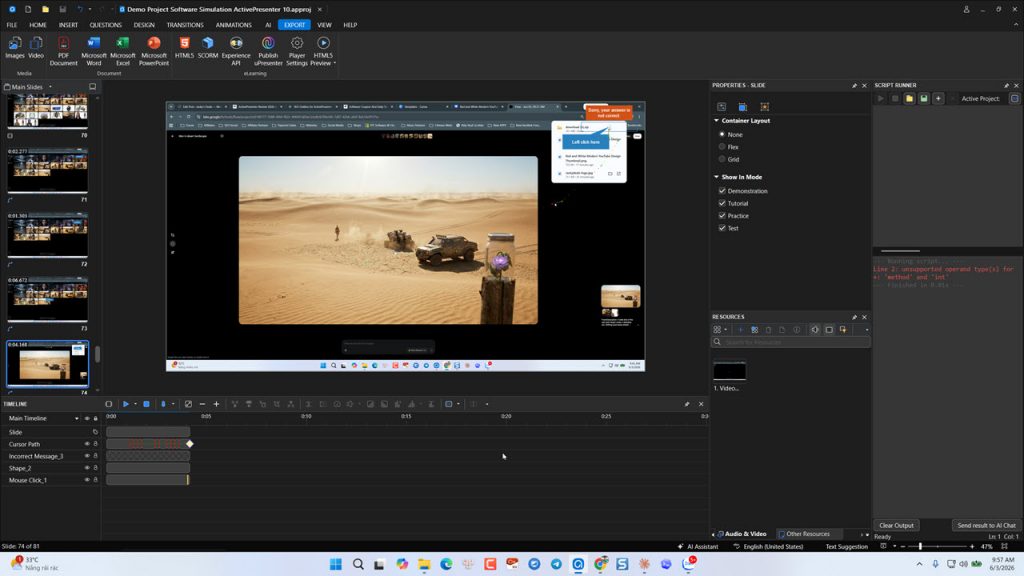 The absolute standout feature of this software is its Record Software Simulation mode. When you launch this engine, it does not just record a flat video file of your desktop screen. Instead, it tracks your operating system hooks in real time. Every single time you click a menu, type a string of text, or open a dialog box, the software automatically takes a high-resolution screenshot and creates a separate slide.
When you stop recording, you are left with a fully editable, slide-based lesson. The software automatically generates text callouts based on your actions—for example, writing “Click the File menu” right over the exact coordinates where your mouse moved. It splits the recording into three distinct user experiences: Show Mode (a guided video demonstration), Practice Mode (where the learner must click the correct areas with guidance), and Test Mode (a graded assessment with no hints).
In my testing, this saved me hours of manual editing when building a guide for a complex inventory management system. Instead of cutting up a long video clip and drawing shapes by hand, the software built the entire framework for me in one single recording pass.
Comprehensive Quiz and Assessment Engine
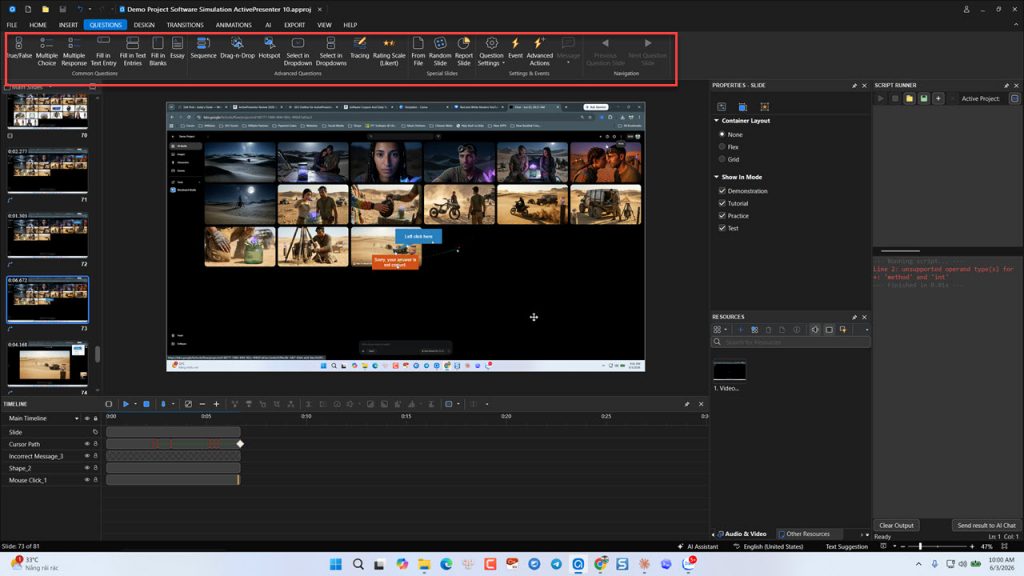 Building interactive assessments is a massive part of educational design. This platform includes 11 distinct, pre-built question types right out of the box. You get standard options like multiple choice, true/false, and fill-in-the-blank, alongside more advanced analytical formats like essay fields, drag-and-drop scenarios, and Likert scales for surveys.
What I appreciate during production is the question pool and randomization system. If you are designing a compliance quiz where you need to prevent users from copying each other’s answers, you can create a master folder of 50 questions. You then instruct the slide deck to pull 10 random questions from that pool every time a new learner starts the module.
Setting up correct and incorrect feedback loops is highly visual. You click on a question wrapper, open the events panel, and tell it exactly what slide to jump to based on the score. It is highly reliable, though formatting the text inside the question blocks can sometimes feel a bit stiff if you stick strictly to the default styles.
Rich Interactivity and Branching Logic
If you want to build non-linear learning experiences—like a scenario where a manager chooses how to handle a difficult employee and the story changes based on their choices—you need branching logic. In many basic tools, this requires writing custom JavaScript lines. In this app, it is managed through an inline events and actions editor.
You can set up variables (both numbers and text strings) to track a student’s progress across an entire course. For instance, you can create a rule that says: If the user has visited Slide 4 and Slide 7, change the state of the hidden button on the home menu to “Active.”
When testing this for a customer onboarding course, the conditional logic worked flawlessly upon export. However, the UI window where you build these triggers is text-dense and highly technical. It does not use a modern drag-and-drop visual flowchart, so you must think logically like a programmer to ensure your conditions do not conflict with each other.
Responsive Design Frameworks
We can no longer assume that learners are sitting at a standard desktop monitor. A huge chunk of corporate training happens on mobile phones or tablets during commutes. The software addresses this through responsive layout sections and flexible slide properties.
Instead of forcing you to build three entirely separate versions of your course, you can set up specific design break points for desktops, tablet landscapes, and mobile portraits. When you adjust an image or a text box on the desktop layout, the software uses relative positioning to scale it down for smaller screens.
During my export tests, the HTML5 output adapted cleanly when I resized my web browser window. Buttons remained large enough to tap comfortably with a thumb, and text columns wrapped correctly without clipping the edges of images. The only caveat is that you must turn on the responsive container settings before you start layout design; trying to convert a static presentation into a responsive one later in the project usually results in a messy layout that takes hours to fix.
Built-in Multi-Track Video and Audio Editor
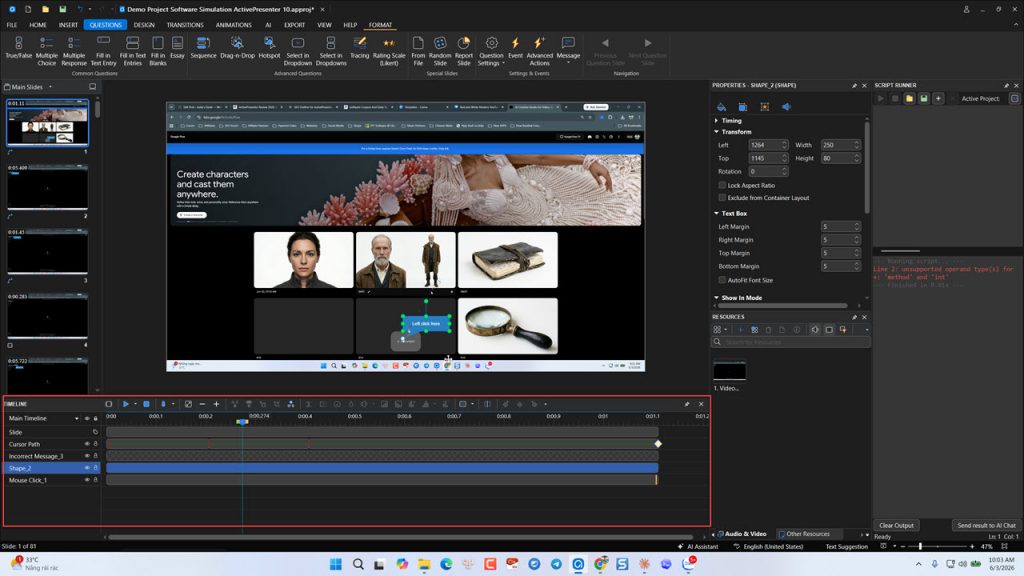 Most authoring packages assume you will do your heavy media editing in external programs like Premiere or Camtasia before importing files. This software includes a legitimate, multi-track timeline built right into the main edit screen, which cuts down on app-switching friction.
You can import multiple video tracks, audio layers, and voiceover stems. The timeline tools allow you to perform precise frame-accurate cuts, split clips, insert silence, or freeze frames to give a learner more time to read an on-screen note. It also includes basic audio normalization and noise reduction sliders.
During my voiceover tests, the background hiss removal was decent enough for quick tutorials, though it won’t replace dedicated audio software if your recording room is highly echoey. Having the ability to speed up or slow down specific segments of screen footage directly alongside my interactive triggers kept my project files small and organized.
ActivePresenter Pricing and ROI
Understanding the long-term cost of your tools is essential for running a profitable business. The software maintains a straightforward perpetual license structure alongside a robust evaluation tier. This means you do not have to worry about monthly recurring charges hitting your credit card when you hit a slow business month.
The following markdown table breaks down the current licensing tiers, prices, features, and target use cases to help you evaluate the true return on investment for your specific setup.
| Plan | Price | Key Features | Best For |
| Free Edition | $0 (Personal use & evaluation) | All design tools, full recording capability, quiz creation. | Evaluating features, learning the UI, and non-commercial personal projects. |
| Standard Edition | $249 per single license (Perpetual) | High-definition video export, multi-track editing, no watermarks, commercial usage rights. | YouTubers, video software reviewers, and creators who only need flat video outputs. |
| Pro Edition | $499 per single license (Perpetual) | All Standard features + HTML5 interactive export, responsive design, SCORM/xAPI packaging, branching logic. | Professional instructional designers, corporate trainers, and online course businesses. |
The financial math here is incredibly clear. If you use Articulate Storyline 360 as an independent freelancer, it sets you back roughly $1,000 every single year. Over a three-year period, that is a $3,000 operating expense. With this software’s Pro Edition, you make a one-time payment of $199 to $399 depending on active promotional deals. Even if you choose to pay a small optional fee for major version upgrades down the line, the long-term savings for small businesses and independent studios run into thousands of dollars.
Pros and Cons: A Realistic Assessment
No software tool is flawless, and any review that claims a product has zero downsides is lying to you. To help you make an informed decision, here is an objective, unfiltered look at what makes this software exceptional and where it will cause you real frustration during your workday.
What I Love (The Pros)
- Exceptional Financial Value: The perpetual pricing model completely removes the anxiety of ongoing subscription bills, allowing small agencies to protect their baseline profits.
- Flawless Simulation Captures: The software simulation tool captures background metadata beautifully, meaning you rarely have to re-record because a mouse click was missed.
- Completely Offline Workflows: Because it runs as a local desktop application, you can record and edit high-resolution courses while traveling without worrying about cloud latency or internet drops.
- Smart Shared AI Resource Pools: If your business purchases multiple seats under a single license key, your AI text-to-speech credits are pooled across all installations automatically.
- Industry Standard LMS Compatibility: The HTML5 packages export smoothly into SCORM 1.2, SCORM 2004, xAPI, and cmi5 formats, tracking scores perfectly inside platforms like Moodle or TalentLMS.
What Needs Work (The Cons)
- Intimidating, High-Density Interface: The UI feels like an engineering app mixed with PowerPoint. There are deep sub-menus everywhere, and the learning curve for beginners is genuinely steep.
- No Native Asset Library: Unlike cloud subscription models that give you instant access to millions of stock characters, photos, and icons, you must source and import every media file yourself.
- Dated Player Templates: The out-of-the-box UI themes for course players, button designs, and quiz layouts look old-fashioned and require manual styling to look modern.
- Lack of Live Team Collaboration: Because files live locally on your computer, you cannot have two designers co-authoring the exact same slide simultaneously like you can in web-native apps.
Try ActivePresenter free here. No credit card require!
Who Should Use ActivePresenter?
Because the feature set varies wildly between flat video and complex HTML5 interactivity, the software is not a one-size-fits-all solution. Based on my evaluation, it fits three specific user groups perfectly.
Independent Instructional Designers and Boutique Agencies
If you run a solo consulting business or a small agency, software overhead can easily destroy your profitability. This platform gives you the heavy-duty interactive capabilities required by enterprise clients—such as complex branching, custom variables, and full SCORM compliance—without the crushing annual renewal fees. It allows you to bid competitively on large e-learning contracts while keeping your internal tool costs fixed.
Technical Trainers and SaaS Educators
If your primary job is teaching people how to use software applications, digital platforms, or internal company databases, this tool is an absolute no-brainers. The automated screen simulation engine turns what is normally a tedious, week-long video editing process into a single afternoon of recording. It allows you to scale up technical training libraries at a speed that simple video editors cannot match.
Budget-Focused K-12 and Higher Ed Institutions
Schools and universities are frequently bound by strict annual budget approvals. A surprise increase in a cloud software subscription can cause an entire department to lose access to their tools. Because this software offers a perpetual license alongside generous educational discounts, academic tech teams can purchase it once out of a single grant cycle and use it securely for years.
Head-to-Head Comparison: ActivePresenter vs. Competitors
To truly understand where this software sits in the market landscape, you have to look at how it handles real work compared to the two major corporate giants dominating the e-learning industry today.
Versus Articulate Storyline 360
Articulate Storyline 360 is widely considered the safe, corporate standard for instructional design teams. It features a brilliant, modern cloud-review system and gives you direct access to an enormous library of stock characters and photos. However, Storyline remains locked behind a expensive, annual-only subscription wall and only runs natively on Windows. This app matches Storyline on almost every advanced logical trigger, runs beautifully on both Mac and Windows, and completely outclasses Storyline’s basic screen recording tools—all for a fraction of the cost.
Versus Adobe Captivate
Adobe Captivate recently underwent a dramatic top-to-bottom redesign to focus on hyper-modern, responsive web layouts. While the new Captivate interface is very clean, Adobe stripped out many of the advanced variables, deep logic rules, and complex simulation controls that power-users rely on for technical training. This software retains all of that deep, granular control. If you need to build highly intricate, customized software tests with precise scoring mechanics, it remains significantly more capable than the simplified version of Captivate.
The following table summarizes these critical platform differences:
| Feature / Metric | ActivePresenter Pro | Articulate Storyline 360 | Adobe Captivate (New) |
| Pricing Model | Perpetual ($499 one-time) | Annual Subscription (~$1,000+/yr) | Monthly Subscription (~$400/yr) |
| OS Compatibility | Windows & macOS (Native) | Windows Only (Requires VM on Mac) | Windows & macOS (Native) |
| Simulation Quality | Elite (4 automated modes) | Basic (Requires manual tracking) | Moderate (Streamlined but limited) |
| Media Asset Library | None (Bring your own) | Massive (Content Library 360) | Small Integrated Library |
Final Verdict and Rating
My Rating: 4.7 / 5 Stars
ActivePresenter Pro is the smartest financial choice an independent digital educator or software trainer can make today. While its complex interface requires real time to master and you have to bring your own media assets, its industry-leading software simulation engine, offline reliability, and perpetual pricing model make it an elite powerhouse that easily matches tools costing three times as much.
Bottom line: If you create eLearning courses regularly, ActivePresenter is worth every dollar.
Check the latest price and deals
Download ActivePresenter Pro here!
Frequently Asked Questions
Q: Can I install ActivePresenter on both my desktop and laptop with one license?
A: A standard single-user license key allows you to activate the software on one primary computer. However, if your team or company purchases multiple seats under a single license key, all of your advanced AI text-to-speech credits are automatically pooled together and shared seamlessly across all of those activated installations.
Q: Will courses exported from ActivePresenter work on mobile devices?
A: Yes, provided you export your project using the HTML5 format. The software features a built-in responsive design editor that automatically scales, repositions, and optimizes your buttons, text layouts, and interactive modules to fit mobile phone screens, tablets, and desktop monitors cleanly.
Q: What happens when a new major version of the software comes out?
A: Your perpetual license gives you the right to run the version you purchased forever, along with all minor bug fixes and point updates for that version. When a major new version launches (such as moving from version 9 to a completely new generation), you can choose to stick with your current software for zero cost, or pay a heavily discounted upgrade fee to access the new features.
Q: Do I need an external Learning Management System (LMS) to use it?
A: No, you do not need an LMS if you only want to export standard MP4 videos or standalone interactive HTML5 packages to upload directly to a standard website. However, if you want to track individual student scores, pass/fail statuses, and detailed question response times, you will need to upload the exported SCORM or xAPI package into an LMS.
Q: Are there watermarks placed on the files I create?
A: If you are using the Free Evaluation Edition, standard video exports will include a visible product watermark, and interactive HTML5 exports are restricted to non-commercial personal use. Once you purchase and activate a Standard or Pro license key, all watermarks are instantly removed from your past and future exports.
Disclosure: This article contains affiliate links. If you purchase through our links, we may earn a commission at no extra cost to you.



![How to Purchase ActivePresenter 10 for the Best Price? [Updated 20% Off Discount Codes/Promotions]](https://jackydeals.com/wp-content/uploads/2025/10/ActivePresenter-10-Coupon-Codes.png)