The Ultimate ActivePresenter Pricing & License Guide: Find Your Best ActivePresenter Discount Coupon Inside!
 Jacky
Jacky 
In the rapidly evolving world of digital education, choosing the right authoring tool is often the difference between a project that engages learners and one that falls flat. If you’ve spent any time researching eLearning software, you’ve likely encountered ActivePresenter. Developed by Atomi Systems, it has gained a reputation as the “Swiss Army Knife” of screen recording and interactive pedagogy.
However, for many instructional designers and corporate trainers, the biggest hurdle isn’t the software’s capability—it’s navigating the ActivePresenter pricing structure. Should you stick with the Free edition? Is the Standard edition enough for your YouTube channel? Or do you need the Pro version to satisfy your LMS requirements?
In this deep-dive guide, we will break down every license tier, analyze the long-term ROI, and—most importantly—show you exactly how to use an ActivePresenter discount coupon to get the professional features you need without breaking the bank.
 1. ActivePresenter Version Comparison: Which One Fits Your Mission?
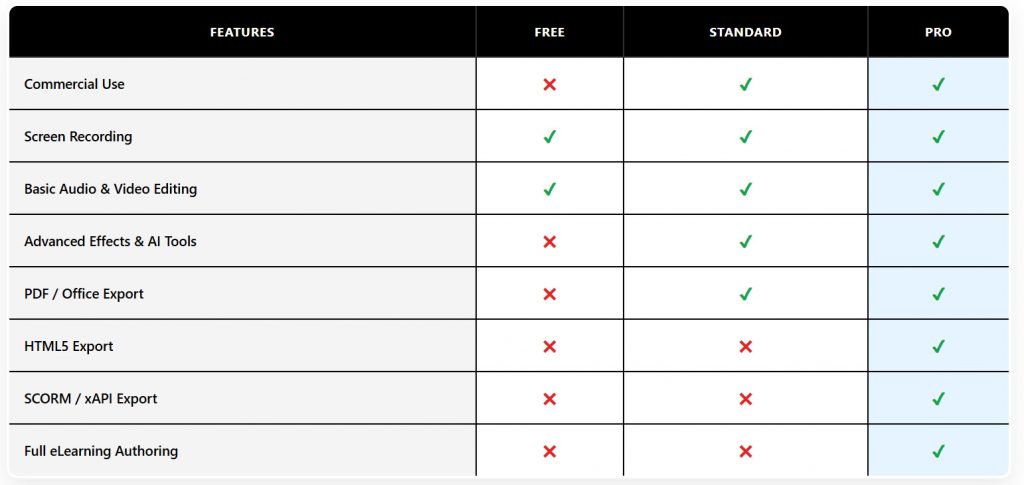
Before hunting for an ActivePresenter code, you must first identify which version aligns with your technical needs. ActivePresenter offers three distinct tiers, each designed for a specific type of creator.
The Free Edition: The Ultimate Sandbox
Unlike many “Free Trials” that expire after 14 days, the ActivePresenter Free Edition is a fully functional tool.
- Best for: Students, hobbyists, and those learning the ropes of eLearning.
- The Catch: While it allows for high-quality screen recording and basic editing, any advanced features (like interactive quizzes or HTML5 exporting) will result in a watermark on your final output.
- Verdict: Great for testing the waters, but not suitable for professional or commercial use.
The Standard Edition: The Video Creator’s Choice
At a mid-range price point, the Standard edition focuses heavily on video production.
- Key Features: Advanced audio/video editing, Green Screen (Chroma Key), Blur effects, and exporting to MP4, AVI, WebM, and MKV.
- Who it’s for: YouTubers, software reviewers, and trainers who only need to produce “passive” video content.
- Missing Features: watermark will appear when exporting to HTML5, SCORM or xAPI packages.
The Pro Edition: The Gold Standard for eLearning
This is where ActivePresenter truly shines. The Pro edition is a direct competitor to industry giants like Articulate Storyline and Adobe Captivate.
- Key Features: Responsive design, interactive simulations, conditional logic (Variables), 11 types of quizzes, and full SCORM 1.2/2004/xAPI support.
- Who it’s for: Instructional Designers, Corporate HR departments, and Professional Educators.
- Why use an ActivePresenter discount coupon here? Since this is the most expensive tier, applying a discount provides the highest monetary savings.
Feature Comparison Table
 2. Why ActivePresenter is the “Solution of Choice” for 2026
When we look at the landscape of eLearning tools, ActivePresenter stands out as a “solution of choice” for several reasons. If you are tired of the “subscription trap” where you lose access to your files the moment you stop paying monthly, ActivePresenter is your sanctuary.
USP 1: The Perpetual License Model
Most competitors have moved to a SaaS (Software as a Service) model. ActivePresenter remains committed to the perpetual license. You pay once, and you own that version forever. For freelancers and small businesses, this predictability is a massive financial relief.
USP 2: The All-in-One Workflow
Typically, an eLearning developer needs:
- A screen recorder (like Camtasia).
- A video editor (like Premiere Pro).
- An authoring tool (like Storyline).
ActivePresenter replaces all three. You can record a software demo, perform frame-accurate video editing, and add interactive “Click Here” triggers all within a single interface. This streamlined workflow reduces “context switching” and speeds up production by up to 40%.
USP 3: Unrivaled LMS Compatibility
Whether your organization uses Moodle, Canvas, Blackboard, or a custom-built LMS, ActivePresenter’s Pro edition ensures your content communicates perfectly. By supporting SCORM 2004 and xAPI (Tin Can API), you can track exactly how long a student spent on a slide and which questions they struggled with most.
3. How to Save: Using an ActivePresenter Discount Coupon
If you’ve decided that the Pro or Standard version is right for you, your next step is to ensure you’re getting the best price. Searching for an ActivePresenter code is a smart move that can save you anywhere from 10% to 40% depending on the season. On this site, we’re offering 20% OFF all ActivePresenter license discount coupon codes since we are a long term partner of Atomi Systems. We can even make a quote for your if you want.
Types of Discounts Available
- Educational Discount: If you are a student, teacher, or work for a non-profit, Atomi Systems offers a significant price reduction (often up to 40% off). You will need to provide a valid .edu email or proof of employment.
- Volume Licensing: Buying for a team? Purchasing 3 or more licenses triggers an automatic volume discount.
- Seasonal Promo Codes: During events like Black Friday, Cyber Monday, or Back-to-School season, you can often find a public ActivePresenter discount coupon on their official site or through authorized partners.
Step-by-Step: Applying your ActivePresenter Code
To ensure your discount is applied correctly, follow these steps:
- Visit the ActivePresenter Online Store.
- Select your desired edition (Standard or Pro).
- On the checkout page, look for the box labeled “Coupon Code” or “Discount Code”.
- Enter your ActivePresenter code and click “Apply”.
- Verify that the total price has dropped before entering your credit card or PayPal details.
4. Deep Dive: Creating Interactive Simulations with ActivePresenter Pro
To justify the investment in a Pro license, let’s look at one of its most powerful features: Software Simulations.
Imagine you need to train 500 employees on a new CRM system. You could record a video, but learners often “zone out” during passive watching. With ActivePresenter, you can record the software and automatically generate:
- Demonstration Mode: A video showing how it’s done.
- Tutorial Mode: The learner must click the correct buttons to proceed, with guidance.
- Practice Mode: The learner performs the task without help; the software tracks errors.
- Test Mode: A scored assessment of their ability to use the software.
This “Record Once, Publish Four Ways” approach is why professionals hunt for an ActivePresenter discount coupon—the time savings alone pay for the license within the first project.
5. Frequently Asked Questions (FAQ)
“Can I use my license on two computers?”
Yes. ActivePresenter licenses are typically per-user. You can install it on your desktop and your laptop, provided you are the only one using it.
“Is the ActivePresenter discount coupon valid for upgrades?”
Generally, yes. When Atomi Systems releases a major new version (e.g., moving from version 9 to 10), existing users get a discounted upgrade price, and sometimes additional codes can be applied.
“What happens if I don’t use an ActivePresenter code?”
You simply pay the standard retail price. While it’s still a great value, taking 5 minutes to look for a coupon is always recommended for budget-conscious creators.
6. Final Verdict: Is it Worth It?
If you are a professional looking to create high-end, interactive training that tracks learner progress, ActivePresenter Pro is an unbeatable value—especially when compared to the $1,000+ annual subscriptions of its competitors.
The combination of a perpetual license, a powerful video editor, and advanced eLearning logic makes it a top-tier choice for 2026. By utilizing an ActivePresenter discount coupon, you effectively lower your “cost per project” to nearly zero over the lifespan of the software.
Ready to Elevate Your Training?
Don’t settle for boring slide decks. Turn your expertise into an interactive experience Save today: Use your ActivePresenter code at checkout to unlock the full power of the Pro Edition.