 Jacky
Jacky Let’s be honest: most internal training content is created too slowly and becomes outdated too quickly. The bottleneck? Overly complex software that only a handful of people know how to use. What if your subject matter experts (SMEs)—the people with the actual knowledge—could create engaging courses themselves, without any technical training?
That’s the promise of EasyGenerator, a cloud-based authoring tool that’s shaking up how companies approach eLearning by putting content creation directly into the hands of the experts. But does it live up to the hype? This comprehensive review will dive deep into EasyGenerator, exploring its strengths, weaknesses, and ideal use cases. We’ll provide a step-by-step guide on how to use it and, for those who need more power and customization, we’ll introduce a compelling desktop based authoring tool, ActivePresenter 10, as one of the most affordable alternatives to EasyGenerator. For your information, both tools are in our list of 15+ best eLearning authoring tools for trainers.
What is EasyGenerator?
Imagine an online, cloud-based platform where you can build a complete eLearning course just by dragging and dropping content blocks, no advanced technical skills required. That’s the core idea behind EasyGenerator. Its biggest selling points are its undeniable ease of use and the convenience of not needing to install any software.
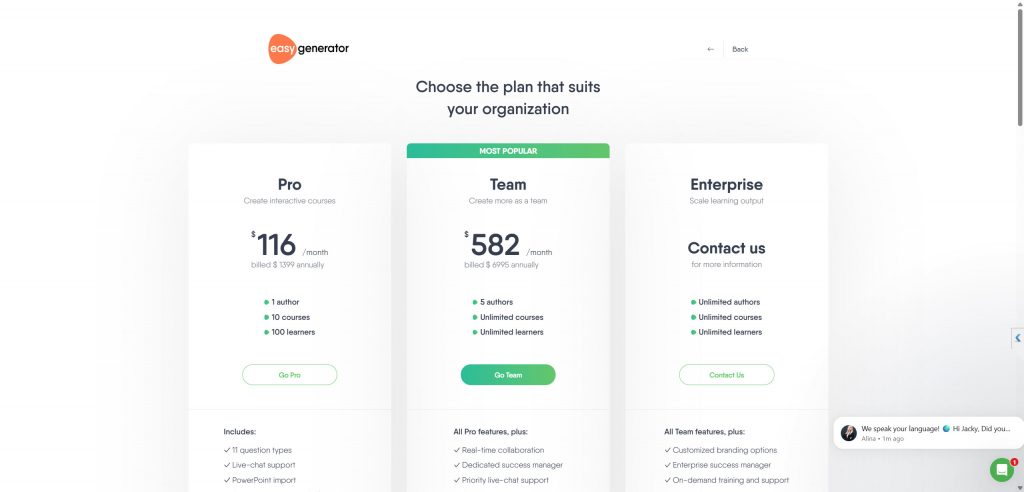
But how “easy” is it to actually get started? The path to a trial account is surprisingly complex, requiring a business email just to get access. Once you’re in, the subscription price isn’t exactly cheap. They are offering Pro license at $399/annually and Team license at $6995/annually. So, is EasyGenerator’s simplicity worth the high barrier to entry and cost?
 EasyGenerator is ideal for:
- Large enterprises looking to scale their content creation efforts.
- Subject matter experts (SMEs) who need to share their knowledge without a steep learning curve.
- Learning & Development (L&D) departments that want to facilitate and manage SME-generated content.
- Teams that require strong real-time collaboration and review features.
The Pros: Why Choose EasyGenerator?
EasyGenerator’s popularity stems from a clear set of advantages that cater directly to the needs of modern organizations.
 1. Unmatched Ease of Use
This is EasyGenerator’s cornerstone. The user interface is clean, intuitive, and requires virtually no training to get started. With a “what-you-see-is-what-you-get” (WYSIWYG) editor, content blocks, and pre-built templates, users can build a professional-looking course in a fraction of the time it would take with more complex software. You can simply drag and drop text, images, videos, and various question types to structure your course.
2. Powerful Collaboration Features
Being cloud-based, EasyGenerator excels at teamwork. Multiple authors can work on the same course simultaneously in real-time. You can invite SMEs to contribute content to specific sections, leave comments, and track changes seamlessly. The built-in review and feedback tools eliminate the cumbersome process of emailing different versions of a course back and forth, streamlining the entire development lifecycle.
3. Fully Cloud-Based and Accessible
There’s no software to install or maintain. All you need is a web browser and an internet connection. This makes it incredibly easy to roll out to a large team, regardless of their location or device (Mac, Windows, etc.). Updates are automatic, ensuring you always have the latest features and security patches. All your courses are stored centrally, making them easy to manage, update, and access from anywhere.
4. AI-Powered Content Creation
EasyGenerator has integrated AI to further accelerate the course creation process. Its AI assistant can help you generate entire courses from a simple prompt, create relevant questions for your content, and suggest learning objectives. While it serves as a starting point that requires human refinement, this feature is a massive time-saver for generating initial drafts and overcoming writer’s block.
5. Responsive Design by Default
Every course created in EasyGenerator is automatically optimized for all devices—desktops, tablets, and smartphones. You don’t need to create different versions or worry about compatibility issues. The platform handles the responsiveness, ensuring a consistent and accessible learning experience for everyone.
6. Excellent Support and Onboarding
EasyGenerator is well-regarded for its customer support. With live chat, a comprehensive help center, and dedicated success managers (on higher-tier plans), users are well-supported. The onboarding process is smooth, helping new authors feel confident and capable from day one.
The Cons: Where EasyGenerator Falls Short
No tool is perfect, and EasyGenerator’s focus on simplicity comes with certain trade-offs.
1. Limited Customization and Branding Control
While you can apply your company’s logo and color schemes, the overall design and layout options are constrained by the platform’s templates. Experienced instructional designers seeking granular control over every visual element—fonts, object positioning, and complex animations—will find EasyGenerator restrictive compared to desktop authoring tools.
2. Fewer Advanced Interactivity Options
EasyGenerator provides a solid range of question types and basic interactions. However, it lacks the advanced capabilities needed for creating complex simulations, branched scenarios with variables, or gamified experiences. You cannot create conditional triggers or custom interactions that depend on a learner’s specific actions, which limits the depth of engagement for highly interactive training modules.
3. Subscription-Based Model (Recurring Cost)
As a SaaS product, EasyGenerator operates on a subscription model. While this provides continuous updates and support, the costs can add up over time, especially for small teams or individuals. Unlike desktop software that often comes with a one-time perpetual license, you’ll need to maintain your subscription to keep creating and managing courses.
4. Internet Dependency
The flip side of being cloud-based is that you are entirely dependent on an internet connection. You cannot work offline. This can be a significant drawback for users who travel frequently or work in areas with unreliable connectivity.
5. Basic Reporting
While EasyGenerator provides built-in results tracking, its analytics and reporting capabilities are more basic than what you’d find in a full-fledged Learning Management System (LMS). For in-depth learner analytics, you will still need to publish your course to a dedicated LMS.
How to Use EasyGenerator: A Step-by-Step Guide
Creating a course in EasyGenerator is a straightforward process that can be broken down into five key steps. Don’t forget to use your business email to sign up a trial account with EasyGenerator first.
Step 1: Create a New Course
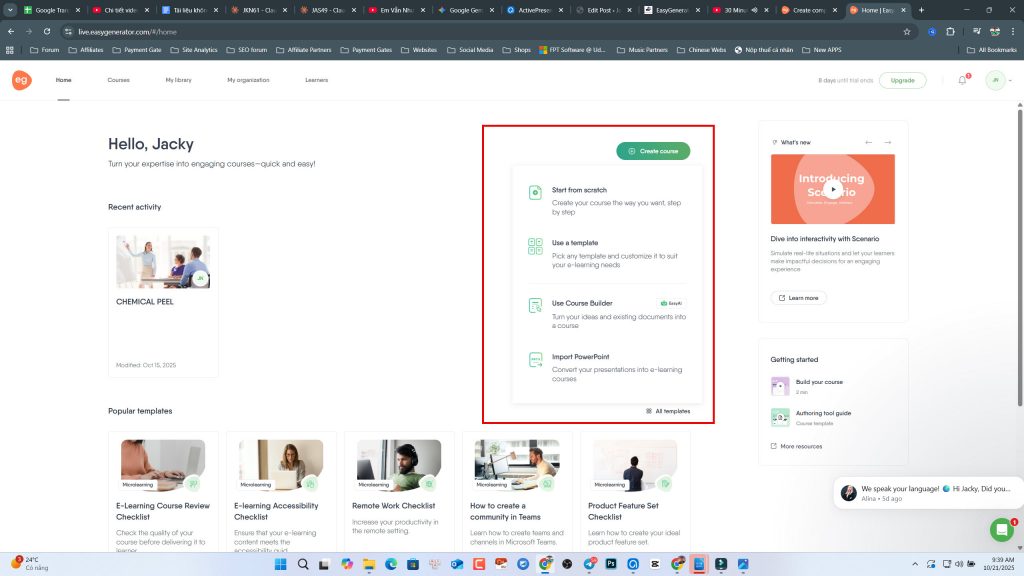
From your dashboard, click “New Course.” You can start from a blank slate or choose one of the available templates designed for specific use cases like employee onboarding, compliance training, or product tutorials. Give your course a title and a brief description.
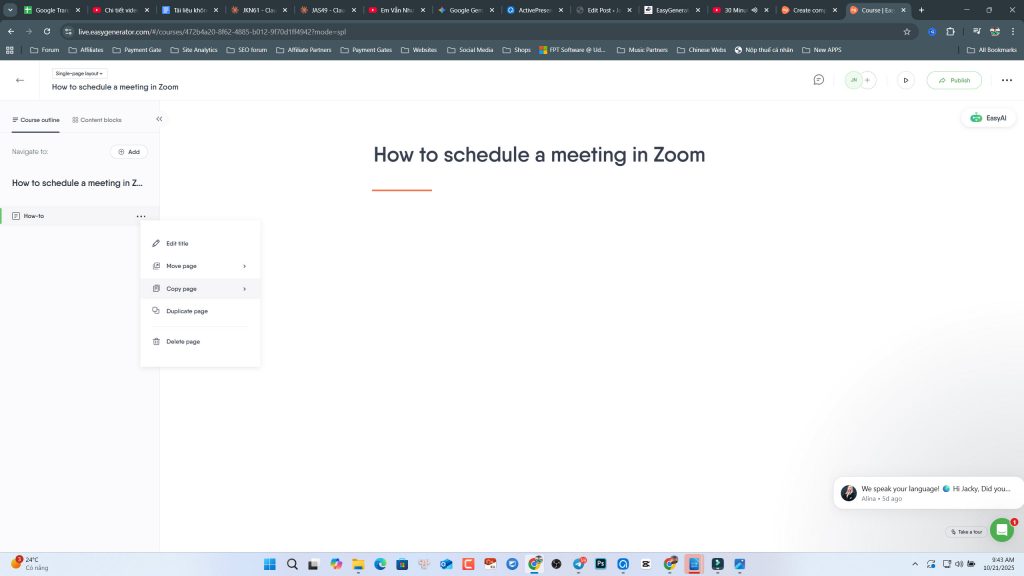
 Step 2: Add and Structure Your Content
This is the core of the authoring process. A course is built using Sections and Content Blocks.
- Sections: Think of these as chapters or modules that organize your content.
- Content Blocks: Within each section, you add content blocks. EasyGenerator offers a wide variety, including:
- Text and Image blocks
- Video and Audio embedding
- Document uploads (PDFs, PowerPoints)
- Interactive blocks like hotspots, flip cards, and accordions.
You simply drag and drop these blocks into place and populate them with your content. The AI assistant can be used here to help draft text or suggest content structure.
 Step 3: Build Assessments (Quizzes)
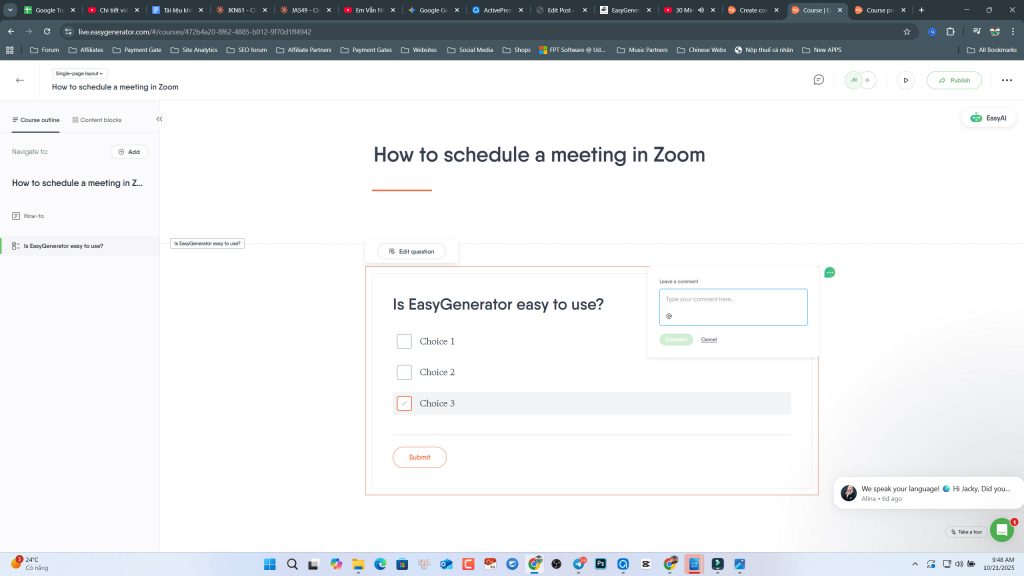
To test your learners’ knowledge, you can add question blocks. EasyGenerator supports over 10 question types, such as:
- Multiple Choice
- Fill-in-the-Blanks
- Drag-and-Drop Text
- True/False
- Hotspot (image-based questions)
You can set passing scores, provide feedback for correct/incorrect answers, and even create question banks to randomize quizzes.
 Step 4: Configure Course Settings and Design
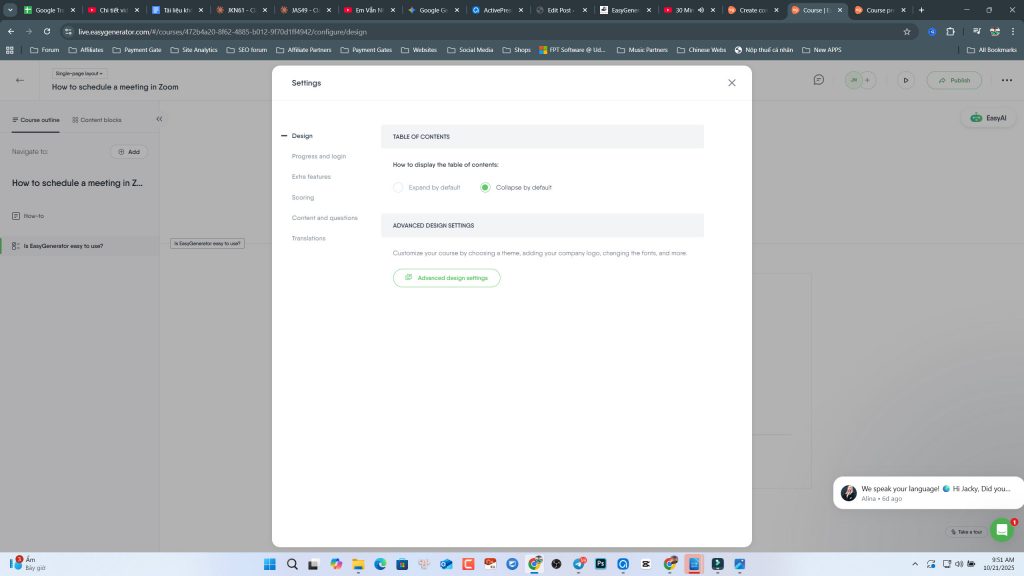
In the “Configure” tab, you can manage settings like:
- Design & Branding: Apply your company’s logo and theme colors.
- Results Tracking: Decide how to track learner progress (e.g., completion, score).
- Navigation: Choose between free or restricted navigation.
- Certificates: Automatically issue a branded certificate upon successful completion.
 Step 5: Collaborate, Publish, and Share
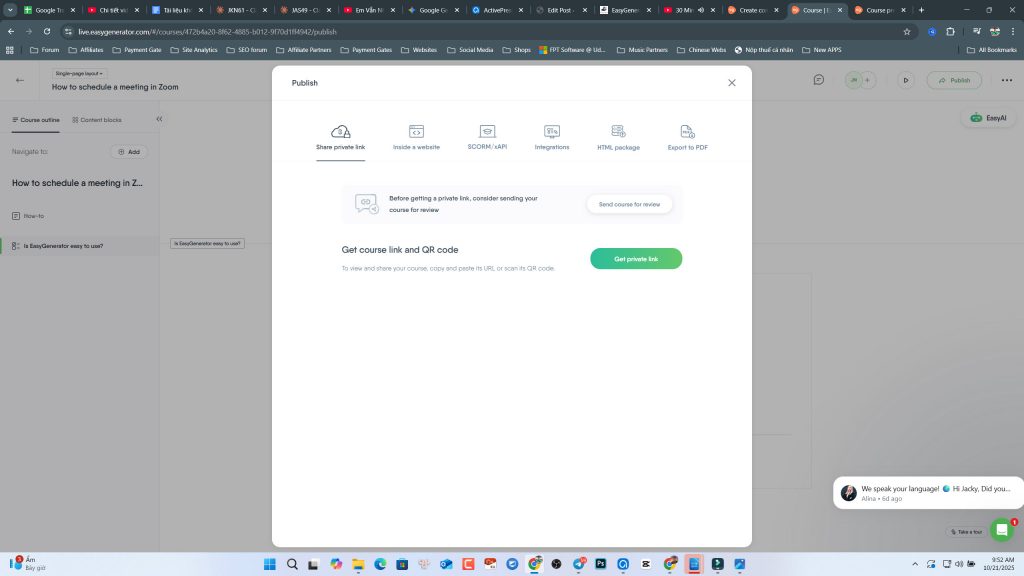
Once your draft is ready, you can invite colleagues to review it using the “Collaborate” feature. After incorporating feedback, head to the “Publish” tab. You have several options:
- Share a Private Link: The easiest way to distribute your course. EasyGenerator hosts it for you.
- Publish to your LMS: Export the course as a SCORM, xAPI (Tin Can), or AICC package to upload to your existing LMS.
- Embed on a Website: Get an embed code to place the course directly on your website or intranet.
 The Verdict: Who is EasyGenerator Really For?
EasyGenerator is an outstanding tool for its target audience. It succeeds brilliantly in its mission to make eLearning authoring accessible to everyone, especially non-technical subject matter experts.
Choose EasyGenerator if:
- Your primary goal is speed and efficiency in content creation.
- You have a decentralized model where many SMEs need to create content.
- Collaboration is a critical part of your workflow.
- Your training content consists mainly of information, processes, and standard knowledge checks, rather than complex software simulations.
Look for an alternative if:
- You need complete creative control and highly customized branding.
- Your courses require complex interactivity, variables, and branching scenarios.
- You need to create detailed software simulations and tutorials.
- You prefer a one-time purchase over a recurring subscription.
The Alternative: When You Need More Power and Control
If you find yourself in the second group, your needs have likely outgrown the capabilities of a simplified cloud-based tool. This is where desktop authoring software becomes the superior choice. Desktop tools offer unparalleled power, advanced features, and offline access—all for a one-time cost.
Best Desktop Authoring Software: ActivePresenter 10
For users seeking the ultimate combination of power, flexibility, and value, we strongly recommend ActivePresenter 10 by Atomi Systems. It is a comprehensive, all-in-one eLearning authoring tool that excels in all the areas where EasyGenerator is limited.
Why ActivePresenter 10 is the Best Alternative:
- Advanced Interactivity and Branching: ActivePresenter allows you to create highly sophisticated learning experiences using variables, conditional actions, and events. You can build complex branching scenarios, personalized learning paths, and intricate simulations that react to learner input.
- Best-in-Class Screen Recording and Software Simulation: This is ActivePresenter’s signature feature. It can record your screen and automatically create a step-by-step interactive simulation with customizable feedback, hints, and annotations. It’s the perfect tool for creating software training, tutorials, and system demos.
- Full-Featured Video and Audio Editor: ActivePresenter isn’t just an authoring tool; it includes a powerful, non-linear video editor. You can cut, trim, and merge video, add animations, apply zoom-n-pan effects, insert closed captions, and edit audio without needing separate software.
- Complete Customization Freedom: With ActivePresenter, you have total control over the look and feel of your courses. The slide-based editor works like PowerPoint but with far more power. You can customize every element, create your own themes and templates, and design pixel-perfect layouts.
- Robust Quizzing and Assessment: It offers 13 different question types, extensive feedback options, and advanced features like question pooling, randomization, and detailed reporting.
- Perpetual License (One-Time Cost): You buy ActivePresenter once and own it forever. This makes it an incredibly cost-effective solution in the long run compared to the ongoing costs of a subscription service.
- AI-Powered Features: The latest version, ActivePresenter 10, has also incorporated AI to generate images from text prompts, convert text to speech with realistic voices, and assist with writing content.
Final Conclusion
EasyGenerator is a fantastic, user-friendly, and highly effective tool for its intended purpose: enabling rapid, collaborative, and scalable eLearning creation by subject matter experts. Its simplicity is its greatest strength, allowing organizations to tap into their internal knowledge base with ease.
However, when your training needs demand more complexity, deeper interactivity, and complete creative freedom, its limitations become apparent. For power users, instructional designers, and anyone creating sophisticated software simulations, a desktop tool is non-negotiable.
In that context, ActivePresenter 10 stands out as the best choice. It offers a professional-grade feature set that empowers you to create truly engaging, interactive, and polished eLearning content without compromise. It successfully bridges the gap between power and usability, making it the ideal step-up for when you’re ready to move beyond the basics.