
 Jacky
Jacky Introduction
Nothing is more frustrating than recording a perfect tutorial or gameplay video, only to find a giant watermark plastered across the center upon export. Worse yet, some “free” tools cut your recording off after just 5 or 10 minutes.
If you are looking for a truly free screen recorder no watermark that gives you unlimited recording time, you are in the right place.
In this guide, we have tested and ranked the best screen recording software for Windows and macOS in 2026. Whether you are a teacher creating e-learning content, a gamer capturing highlights, or a professional needing a quick demo, these tools will help you capture your screen cleanly and professionally.
Let’s dive in.
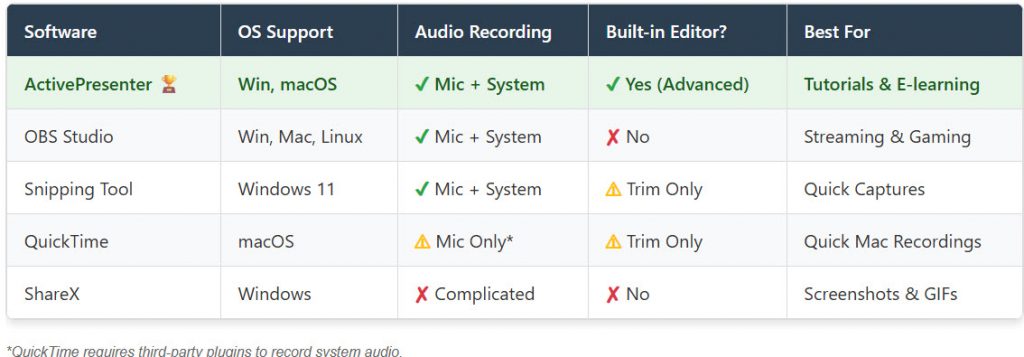
Quick Comparison: Top 5 Free Screen Recorders
Short on time? Here is a quick overview of the best tools based on your needs.
1. ActivePresenter – Best All-in-One for Tutorials & Education
If you need more than just a raw video file, ActivePresenter is arguably the most powerful tool on this list. Developed by Atomi Systems, it is unique because it combines a high-quality screen recorder with a professional video editor.
Unlike other tools where you have to record first and then move to a separate editing software (like Premiere or Camtasia), ActivePresenter lets you record, cut, add annotations, and export—all in one app.
Key Features:
- No Watermark: The Free edition allows you to use all standard features without any watermark.
- No Time Limit: Record for hours if you need to.
- Full Motion Recording: Record full screen, specific window, or a locked region.
- Interactive Editing: Add zoom-n-pan, closed captions, and smart annotations easily.
Pros:
- Excellent quality (supports up to 4K recording).
- Includes a full-featured video editor (Cut, Split, Join, Change Speed/Volume).
- Records system audio and microphone simultaneously.
- Lightweight and stable on Windows and macOS.
Cons:
- The interface is packed with features, which might be overwhelming if you only want a simple “Red Button” tool.
Verdict: The best choice for creators, educators, and anyone who wants to make professional-looking videos without buying expensive software.
[Download ActivePresenter Free Here]
2. OBS Studio – Best for Gamers & Streamers
OBS Studio (Open Broadcaster Software) is the gold standard for open-source screen recording. It is widely used by YouTubers and Twitch streamers because it is completely free, open-source, and incredibly powerful.
Key Features:
- Scene Composition: Mix multiple sources (Webcam, Window Capture, Browser, Images) into one video.
- Live Streaming: Direct integration with YouTube, Twitch, and Facebook.
- High Performance: Optimized for recording high-FPS games (60fps or higher).
Pros:
- 100% Free forever (No watermark, no ads).
- No recording limits.
- Advanced audio mixer.
Cons:
- Steep Learning Curve: It is not user-friendly for beginners. Setting up “Scenes” and “Sources” can be confusing.
- No Video Editor: You strictly record. If you make a mistake, you must use another software to edit the video.
Verdict: The King of recording for Gamers, but overkill for simple office tasks.
3. Windows 11 Snipping Tool – Best Built-in Tool
Did you know Windows 11 has a built-in screen recorder? Microsoft updated the classic Snipping Tool to include video capture. It is already installed on your PC.
Key Features:
- Simple generic interface.
- Records specific areas of the screen.
Pros:
- No installation required.
- Completely free and safe.
Cons:
- Very basic features.
- Limited editing capabilities.
- File sizes can be large.
4. QuickTime Player – Best Built-in for Mac Users
For macOS users, QuickTime Player is the default option. It is clean, simple, and effective for quick tasks.
Key Features:
- Record entire screen or selected portion.
- Show mouse clicks in recording.
Pros:
- Pre-installed on all Macs.
- Simple and intuitive.
Cons:
- No System Audio: By default, QuickTime cannot record internal computer sound (like YouTube video audio or Zoom calls). You need third-party plugins like BlackHole to fix this.
5. Apowersoft Free Online Screen Recorder – Best Web-Based Tool
If you cannot install software (e.g., using a school or work computer), Apowersoft offers a decent web-based launcher.
Key Features:
- One-click recording from the browser.
- Simple interface.
Pros:
- No heavy installation.
- Can record webcam and screen.
Cons:
- Requires a stable internet connection to launch.
- Performance may lag compared to desktop apps.
How to Choose the Right Screen Recorder?
When searching for a “free screen recorder no watermark,” consider these three factors before downloading:
- Audio Sources: Make sure the software can record System Audio (what you hear from speakers) and Microphone simultaneously. ActivePresenter and OBS handle this perfectly.
- Editing Needs: Do you make mistakes? (Who doesn’t?). If you want to trim the beginning/end or cut out “umm” and “ahh,” choose a recorder with a built-in editor like ActivePresenter. Using OBS requires you to learn a second software just to cut the video.
- Output Format: Ensure the tool exports to MP4 (H.264), which is the standard for YouTube and mobile devices.
Frequently Asked Questions (FAQ)
- Is ActivePresenter really free?
Yes. ActivePresenter offers a Free Edition that is fully functional for personal and non-commercial use. It does not place a watermark on your video unless you use specific “Pro” features (advanced interactions), which are clearly marked in the app.
- How do I record my screen with sound for free?
Most tools on this list (ActivePresenter, OBS) allow you to select your Microphone and System Audio in the settings. Ensure you check the volume levels before hitting record.
- Which screen recorder has no time limit?
ActivePresenter and OBS Studio have absolutely no recording time limits. Your only limit is the storage space on your hard drive.
Conclusion
Finding a free screen recorder no watermark doesn’t have to be hard.
- If you are a Gamer or Streamer: Download OBS Studio.
- If you are a Content Creator, Teacher, or Tutorial Maker who needs to edit videos professionally: ActivePresenter is your best choice in 2026.
Ready to start creating?
[Download ActivePresenter for Free & Start Recording Today]