 Jacky
Jacky The landscape of digital education has shifted dramatically. As we move into 2026, the demand for high-quality, interactive online courses is at an all-time high. However, for many independent educators, small business owners, and corporate trainers, the “industry standard” tools often come with a price tag that feels more like a mortgage payment than a software subscription.
Many creators assume that to produce “professional” results, they must invest thousands of dollars into high-end eLearning software. I am here to tell you that this is a myth. With over a decade of experience in the eLearning industry, I have seen creators produce world-class content using tools that cost a fraction of the price of premium suites.
In this guide, we will explore how you can build a professional-grade course on a budget and identify the best affordable eLearning software to help you succeed in 2026.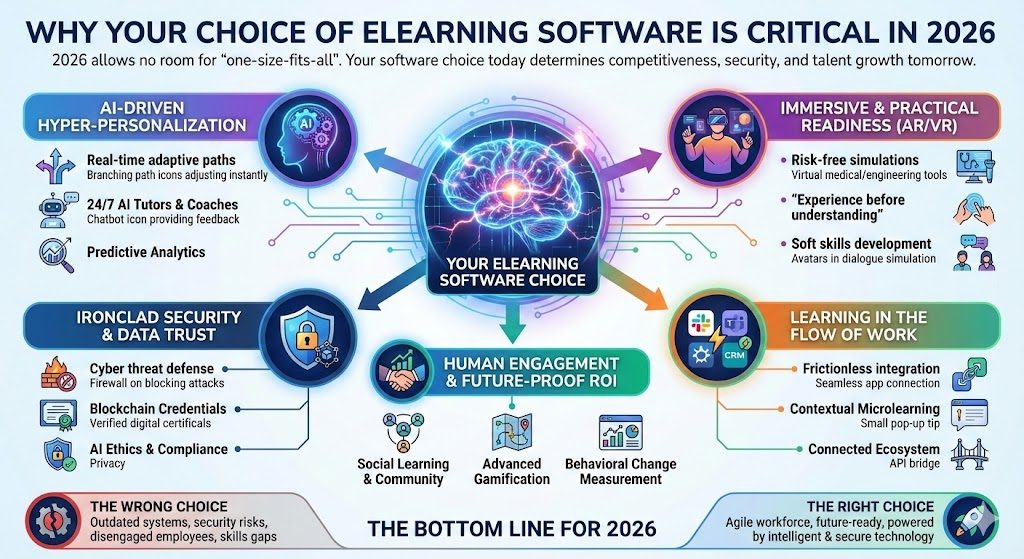
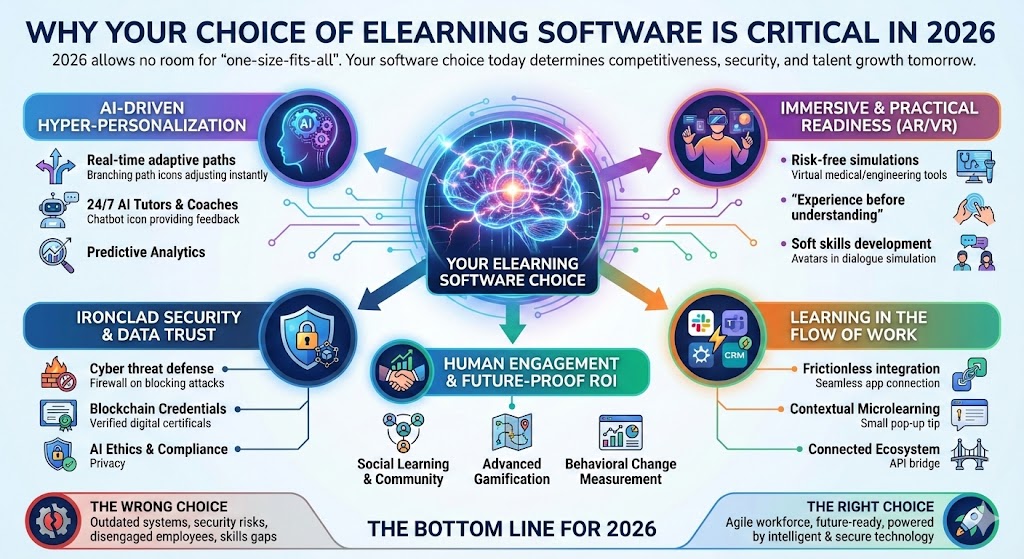
Why Your Choice of eLearning Software is Critical in 2026
In the current market, learners have high expectations. They are no longer satisfied with static PDF slides or simple “talking head” videos. They want interactivity, mobile responsiveness, and high-quality visuals.
If your eLearning software is too basic, your engagement rates will drop. If it is too expensive, your ROI (Return on Investment) will vanish. The goal for new creators in 2026 is to find a “goldilocks” solution: software that is powerful enough to handle complex logic and high-definition video but affordable enough to keep your business profitable.
The Problem with Subscription Fatigue
By 2026, most software has moved to a “SaaS” (Software as a Service) model. While $100 a month might sound manageable at first, these costs add up over years. For a new creator, this “subscription fatigue” can be the biggest barrier to entry. This is why looking for tools with flexible pricing or one-time licenses is a game-changer.
Key Features to Look for in Affordable eLearning Software
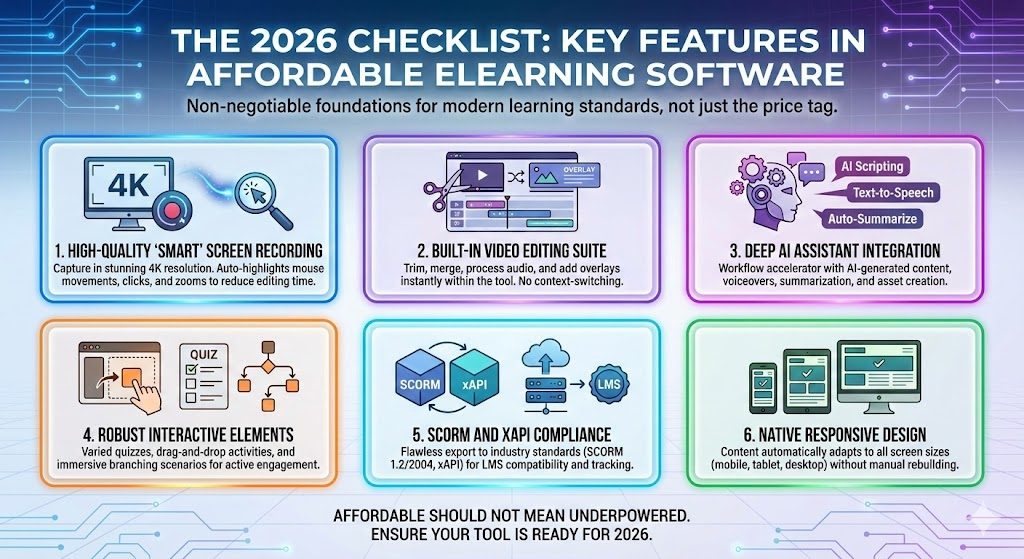
When you are shopping for affordable eLearning software, don’t just look at the price tag. You need to ensure the tool provides the technical foundation for modern learning standards. Here is what I consider non-negotiable in 2026:
- High-Quality Screen Recording: You need to capture your screen in 4K resolution with “smart” features that highlight mouse movements and clicks.
- Built-in Video Editing: Jumping between a video editor and an authoring tool wastes time. A built-in editor allows you to trim, merge, and add overlays instantly.
- AI assistant integration: Artificial intelegence is growing rapidly in recent years.
- Interactive Elements: To keep learners awake, you need quizzes, drag-and-drop activities, and branching scenarios.
- SCORM and xAPI Compliance: If you want to sell your course or upload it to a Learning Management System (LMS), your software must export to SCORM (1.2 or 2004) or xAPI standards.
- Responsive Design: Your content must look perfect on a smartphone, tablet, and desktop.
 ActivePresenter: The Ultimate Budget-Friendly Powerhouse for eLearning Creators
If you are looking for a tool that checks every single box mentioned above without the “corporate” price tag, Atomi ActivePresenter is the solution I recommend most frequently to new creators.
While many tools specialize in either video editing or eLearning authoring, ActivePresenter is a hybrid. It is arguably the most powerful eLearning software available for its price point.
Why ActivePresenter Stands Out in 2026
ActivePresenter has built a reputation for being the “Swiss Army Knife” of course creation. It doesn’t matter if you are making a simple YouTube tutorial or a complex software simulation for a Fortune 500 company; this tool scales with you.
3 Major Competitive Advantages (USPs)
- The “Buy Once, Own Forever” Model: Unlike its competitors (Articulate 360 or Adobe Captivate), ActivePresenter offers a perpetual license. In 2026, where everything is a monthly bill, paying once and owning your software is a massive financial relief for new creators.
- True All-in-One Workflow: Most creators have to buy a screen recorder (like Camtasia), a video editor (like Premiere), and an authoring tool (like Storyline). ActivePresenter replaces all three. You can record your screen, edit the audio/video, add interactive quizzes, and export a SCORM package all within the same interface.
- The Most Generous Free Version on the Market: For those just starting out, the free version of ActivePresenter is incredible. It allows you to test almost every feature. If you are a non-commercial creator, you can even export video content without watermarks, making it the perfect “training wheels” for your first project.
Step-by-Step: Building Your First Professional Course
Using affordable eLearning software like ActivePresenter, you can follow this professional workflow to ensure your course looks like it cost $10,000 to produce.
Step 1: Planning and Storyboarding
Before touching the software, write down your learning objectives. Use a simple tool like Trello or even a Word document to map out your “slides” or “scenes.”
Step 2: Content Capture (The “Smart” Way)
Open ActivePresenter and use the Smart Capture feature. This isn’t just a screen recording; it captures every click and keystroke as a separate slide with automatic callouts. This saves hours of manual editing later.
Step 3: Enhancing with Audio and Visuals
Import your voiceover. In 2026, clear audio is more important than 4K video. Use the built-in audio noise reduction in ActivePresenter to clean up your background hiss. Add “Zoom-n-Pan” effects to focus the learner’s attention on specific parts of the screen.
Step 4: Adding “Active” Interactivity
Don’t just lecture—ask. Insert a multiple-choice quiz or a “Find the Hotspot” activity. In ActivePresenter, you can set Triggers and Variables. For example: “If the learner fails the quiz, send them back to Slide 3.” This level of logic used to require coding skills, but now it is all drag-and-drop.
Step 5: Exporting for the World
Once your masterpiece is ready, export it. If you are uploading to a platform like Moodle, TalentLMS, or Canvas, choose SCORM 2004. This ensures that when a student finishes your course, their progress and score are automatically reported to your system.
Supporting Your Budget Toolkit
While your eLearning software is the heart of your operation, you can round out your studio with these other low-cost or free resources:
- Graphics: Use Canva or Pixabay for royalty-free images and icons.
- Audio: Use Audacity if you need extremely deep audio surgical tools (though ActivePresenter’s built-in tools are usually enough).
- Storage: Use Google Drive or Dropbox for version control and cloud backups.
Common Pitfalls to Avoid When Buying Low-Cost Tools
Being budget-conscious is smart, but being “cheap” can be expensive. Avoid these mistakes:
- Ignoring Technical Support: Some free tools have zero support. ActivePresenter has an active community and responsive support team, which is vital when you hit a technical snag.
- Hidden Watermarks: Always check if your “free” eLearning software puts a giant logo over your content. (Note: ActivePresenter’s paid version removes all watermarks for professional use).
- Lack of Mobile Optimization: If the software produces “Flash” content (which is dead) or non-responsive HTML5, your learners won’t be able to study on their phones.
Conclusion: Professional Results on a Beginner’s Budget
As we head into 2026, the “barrier to entry” for eLearning is no longer money—it is the willingness to learn the tools. You do not need to spend $1,000 a year on a subscription to be a professional.
By choosing affordable eLearning software like ActivePresenter, you gain access to high-end screen recording, advanced video editing, and complex interactivity in one package. It allows you to focus your budget where it matters most: on your content and your marketing.
Your next step? Don’t take my word for it. The best way to see if a tool fits your style is to try it yourself. Download ActivePresenter for free here!



![How to Purchase ActivePresenter 10 for the Best Price? [Updated 20% Off Discount Codes/Promotions]](https://jackydeals.com/wp-content/uploads/2025/10/ActivePresenter-10-Coupon-Codes.png)