![How to Purchase ActivePresenter 10 for the Best Price? [Updated 20% Off Discount Codes/Promotions]](https://jackydeals.com/wp-content/uploads/2025/10/ActivePresenter-10-Coupon-Codes.png)
How to Purchase ActivePresenter 10 for the Best Price? [Updated 20% Off Discount Codes/Promotions]
 Jacky
Jacky Why ActivePresenter 10 is Worth the Investment
ActivePresenter 10, developed by Atomi Systems, is a powerful, all-in-one screen recorder, video editor, and comprehensive eLearning authoring tool. With the integration of AI tools for content generation, image creation, and text-to-speech, it stands as a robust solution for educators, content creators, and corporate trainers.
While the software offers a Free Edition that is fully functional for non-commercial use (outputs will have a watermark on non-free features), unlocking its full potential—especially for professional projects and commercial outputs—requires a paid license.
This guide breaks down the licensing options, current pricing structure, and, most importantly, provides actionable steps to ensure you purchase your ActivePresenter 10 license at the best possible price.
Check out current exclusive ActivePresenter 10 discount codes here!
Step 1: Choose the Right ActivePresenter 10 Edition for Your Needs
Before looking for a discount, you must select the edition that aligns with your specific needs. Choosing the wrong license could mean paying for features you don’t need or, worse, lacking essential tools.
ActivePresenter 10 is typically offered in three main options:
| Edition | Key Features & Target User | License Type | Estimated One-Time Cost |
| Free | Screen recording, basic video editing. Non-Commercial Use Only. (Watermark on advanced outputs) | Free | $0 |
| Standard | Full-featured screen recording, advanced video and audio editing, and standard interactive quiz creation. | Perpetual | $249 |
| Pro | (Recommended for eLearning) Includes all Standard features plus professional eLearning tools (SCORM, xAPI, interactive objects, and advanced question types). | Perpetual | $499 |
🔑 Pro Tip: License Details
- ActivePresenter licenses are perpetual (one-time payment, you own the version forever).
- They are licensed per machine (one license key can be activated on one machine at a time).
- Your purchase includes the latest major version and one year of FREE UPGRADE to any new major versions released within that year.
Step 2: Understand the Current Pricing Structure
The official pricing for ActivePresenter 10 can vary slightly based on regional promotions, but the standard structure for a perpetual license is generally as follows (note: prices are subject to change and should be confirmed on the official Atomi Systems website):
- ActivePresenter Standard Edition: (Historically around $199/license). Now it is $249.
- ActivePresenter Professional Edition: (Historically around $399/license). Now it is $499.
- ActivePresenter 10 Professional EDU: $249
Special Discounts to Look For:
- 20% Off Exclusive ActivePresenter 10 discount coupon code on Jackydeals.
- Educational/Non-Profit Discount: Atomi Systems often offers significant discounts for users in the education sector (students, teachers, schools) and non-profit organizations. If you qualify, this is usually the best way to save.
- Volume Licensing: For businesses, schools, or teams purchasing multiple licenses (5 or more), a volume discount is often available. Contacting their sales team directly is the best approach here.
Step 3: Find and Apply the Best ActivePresenter 10 Discount Code
Finding a valid coupon code is the most direct way to reduce the price. Here’s a strategy to maximize your savings:
1. Official Vendor Promotions (Best Bet)
Always check the official ActivePresenter purchase or pricing page first. Atomi Systems frequently runs banner promotions for seasonal sales (Black Friday, Summer Sale, End-of-Year) or new version launches.
2. Verified Affiliate Coupon Sites such as our site i.e Jackydeals.com
Many eLearning and software review websites partner with Atomi Systems to offer exclusive discounts.
- Typical Discount Rate: Look for codes offering 10% OFF the regular price. This is a common and usually reliable affiliate rate for ActivePresenter Standard and Pro licenses.
- How to Use: These sites usually provide a direct link that applies the coupon automatically at checkout, or they give you a specific code to enter manually.
3. Review Current/Past Codes (for reference only)
While specific codes for ActivePresenter 10 constantly change, previous versions have seen codes like APS15 (for 15% off older versions). Always check and test the most recent codes available on third-party sites, but be aware they might be expired.
⚠️ Important Note on Coupon Codes: Due to the nature of affiliate and temporary promotions, codes can expire quickly. Always try to find a code that specifically mentions ActivePresenter 10 and test it during the final checkout process.
Step 4: The Final Purchase Process (Step-by-Step)
Once you’ve selected your edition and located a potential discount, follow these steps to secure your license:
- Go to the Official ActivePresenter Pricing Page: Navigate directly to the Atomi Systems website.
- Select Your License: Choose the Standard or Pro edition and click the “Buy Now” button.
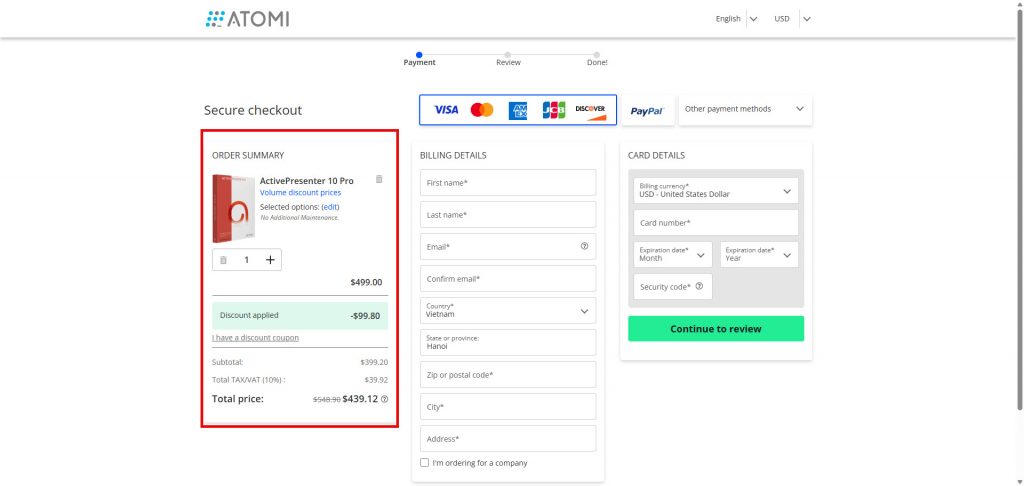
- Review the Order Summary: You will be redirected to the secure payment processor (often a reputable third-party service like Paddle or 2Checkout). Double-check the selected product and quantity.
- Enter the Discount Code (If Applicable): Look for a field labeled “Coupon Code,” “Promo Code,” or “Discount Code” on the payment screen. Enter the code and click “Apply” to confirm the price reduction.
- Provide Billing Information: Enter your email (Crucial! Your license key is sent here), name, and payment details (Credit Card or PayPal).
- Complete the Purchase: Finalize the payment.
- Receive Your Activation Key: Your perpetual license key and download instructions will be sent to the email address you provided.
What Your Purchase Includes:
- The latest major version of ActivePresenter (Version 10).
- Any minor updates and patches to Version 10.
- One year of FREE major version upgrades (e.g., to ActivePresenter 11 if released within the year).
- A permanent, one-time-cost license.
Conclusion: Start Creating Today!
By carefully choosing your edition, exploring educational or volume discounts, and diligently testing updated coupon codes, you can significantly lower the cost of entry for ActivePresenter 10. Start with the free edition to ensure it meets your needs, then use this guide to confidently secure your paid license at the best price and unlock the full power of this AI-enhanced eLearning tool!