

 Jacky
Jacky Overview of Adobe Captivate
Adobe Captivate has evolved significantly since its inception, transforming from a simple screen recording utility into one of the most powerful eLearning authoring platforms available today. In the rapidly changing landscape of digital learning, where organizations demand sophisticated training solutions, Captivate positions itself as a comprehensive tool for creating immersive, interactive educational content.
The software targets instructional designers, eLearning content developers, training specialists, and learning and development professionals who need to create engaging courses that go beyond traditional slide presentations. With the release of versions 12.1 through 12.6 in 2025, Adobe has integrated cutting-edge artificial intelligence, enhanced accessibility features, and improved collaboration tools, making it a formidable option in the competitive eLearning authoring space.
What sets Adobe Captivate apart from simpler course creation tools is its ability to handle complex projects requiring advanced interactivity, software simulations, and virtual reality experiences. However, this power comes with complexity that may not suit every user or organization. This comprehensive review examines whether Adobe Captivate’s robust feature set justifies its learning curve and subscription cost in 2025.
For organizations evaluating eLearning solutions, understanding Captivate’s capabilities, limitations, and ideal use cases is crucial for making an informed decision that aligns with training objectives and budget constraints.
Core Features and Capabilities
Content Creation Excellence
Adobe Captivate offers a slide-based authoring environment that allows creators to build sophisticated courses with multiple interaction types. The platform excels at creating responsive content that automatically adapts to different screen sizes, ensuring learners can access courses seamlessly across desktop computers, tablets, and mobile devices.
The software’s strength lies in its interactive video capabilities, allowing authors to overlay clickable elements, knowledge checks, and branching scenarios directly onto video content. This feature transforms passive video watching into active learning experiences where learners make decisions that affect their learning path.
Software simulation represents one of Captivate’s most acclaimed features. The tool captures software workflows with remarkable precision, automatically generating step-by-step demonstrations, practice simulations, and assessment scenarios. Users can record once and generate multiple output types, making it invaluable for software training programs.
Artificial Intelligence Integration
The 2025 updates introduce significant AI-powered enhancements that streamline content creation. The AI voice technology supports multiple languages and accents, allowing creators to generate professional narration without recording studios or voice actors. This feature includes customizable voice parameters such as tone, pace, and emphasis, enabling creators to match the voice to their content style.
AI-driven content suggestions help authors identify gaps in their courses and recommend additional interactive elements based on learning objectives. The system analyzes course structure and suggests improvements to enhance learner engagement and knowledge retention.
Advanced Interactivity Tools
The widget gallery represents a major improvement in the 2025 version, offering pre-built interactive elements including flip cards, hotspots, image carousels, and timeline interactions. These widgets eliminate the need for custom programming while maintaining professional appearance and functionality.
Advanced actions and shared actions allow experienced users to create complex interactions with conditional logic, variable manipulation, and dynamic content updates. These features enable sophisticated branching scenarios where learner choices influence subsequent content presentation and assessment paths.
Gamification elements include progress bars, achievement badges, and scoring systems that motivate learners and provide immediate feedback on their performance. These features are particularly effective for compliance training and skill development programs where engagement is crucial.
Integration and Publishing Capabilities
Adobe Captivate supports all major eLearning standards including SCORM 1.2, SCORM 2004, AICC, and xAPI (Tin Can API), ensuring compatibility with existing learning management systems. The direct integration with Adobe Learning Manager eliminates export-import procedures, streamlining content deployment.
The HTML5 publishing engine generates courses that run consistently across browsers and devices without requiring plugins. This approach ensures future compatibility as web standards evolve and legacy technologies become obsolete.
Collaboration features enable team-based development through project sharing, review workflows, and commenting systems. Multiple stakeholders can provide feedback directly within the course structure, reducing revision cycles and improving final course quality.
Strengths and Advantages – Adobe Captivate PROS
Adobe Captivate’s primary strength lies in its comprehensive feature set that accommodates virtually any eLearning requirement. Unlike simpler authoring tools that limit creative possibilities, Captivate provides the flexibility to create highly customized learning experiences that align with specific organizational needs and branding requirements.
The software simulation capabilities remain industry-leading, offering unmatched precision in capturing software workflows and generating multiple training formats from single recordings. This efficiency significantly reduces development time for software training programs while ensuring accuracy and consistency.
Professional-grade output quality distinguishes Captivate from cheaper alternatives. Courses created with Captivate exhibit smooth animations, crisp graphics, and reliable performance across different devices and browsers. This quality is particularly important for customer-facing training programs where presentation standards directly impact brand perception.
The integration with Adobe’s Creative Cloud ecosystem provides seamless workflows for organizations already using Adobe products. Assets created in Photoshop, Illustrator, or Premiere Pro integrate effortlessly into Captivate projects, maintaining design consistency and reducing asset preparation time.
Multi-language support extends beyond interface translation to include comprehensive localization features. The AI voice technology can generate narration in multiple languages from the same script, dramatically reducing the cost and complexity of creating multilingual training programs.
Collaborative development features address the reality of modern course creation, where multiple subject matter experts, reviewers, and stakeholders must contribute to course development. The review and commenting system streamlines feedback collection and implementation, reducing project timelines.
Weaknesses and Limitations – Adobe Captivate CONS
The most significant barrier to Adobe Captivate adoption is its steep learning curve. New users often struggle with the complex interface and numerous feature options, requiring substantial time investment before achieving proficiency. This complexity makes it unsuitable for organizations needing immediate course production or those with limited technical expertise.
Performance issues plague many users, with frequent reports of software crashes, slow rendering, and high system resource consumption. Even on high-specification computers, Captivate can become sluggish when working with media-rich content or complex interactions. These stability issues can significantly impact productivity and project timelines.
The user interface, while modernized in recent versions, remains less intuitive than competitors like Articulate 360. Finding specific features often requires navigating through multiple menu levels, and the layout can feel overwhelming for users accustomed to more streamlined authoring tools.
Publishing processes are time-consuming, particularly for responsive courses with extensive media content. Users frequently report waiting substantial periods for courses to compile, which slows iterative development and testing processes.
Template customization options, while extensive, require advanced knowledge to fully utilize. Beginners often find themselves limited to basic template modifications, unable to achieve the visual designs they envision without significant skill development.
The block-based approach in the new version, while simplifying some aspects of course creation, can feel restrictive for users who want precise control over layout and design elements. This limitation may frustrate experienced designers accustomed to pixel-perfect positioning.
Pricing and Licensing Structure
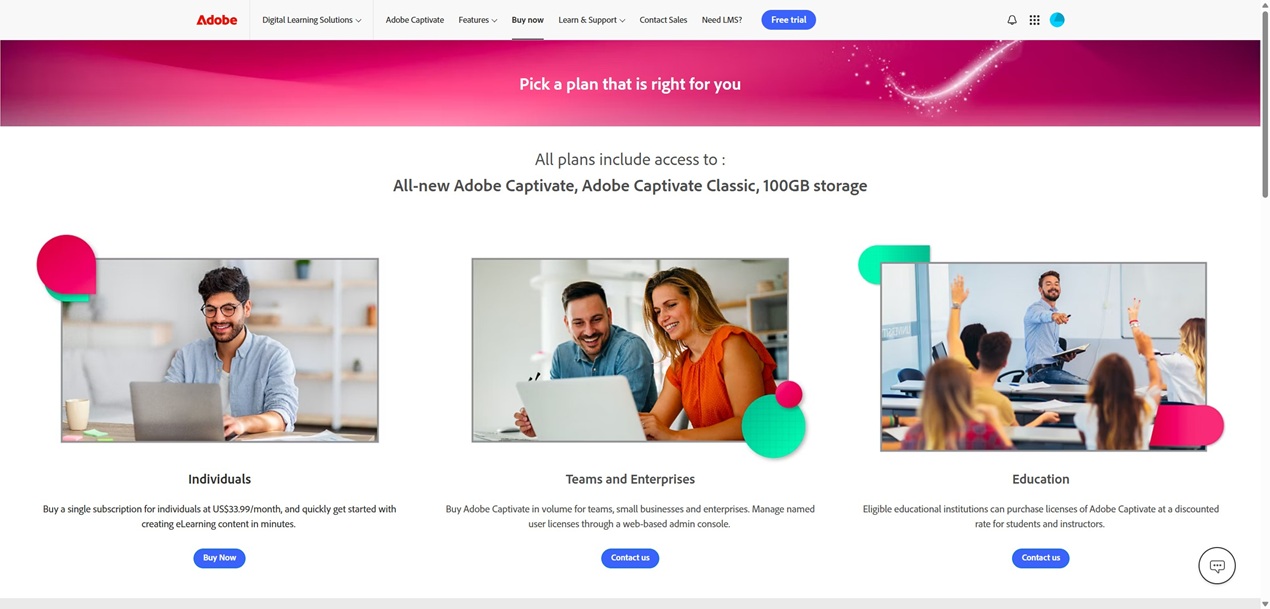 Adobe Captivate follows a subscription-only pricing model, with the individual plan starting at $33.99 per month when billed monthly. This represents a significant ongoing cost compared to one-time purchase alternatives, though Adobe argues that subscription pricing provides continuous updates and feature additions.
Team and enterprise pricing operates on custom quotations based on user count and organizational requirements. Educational institutions receive discounted pricing, though specific rates vary based on eligibility criteria and license quantities.
The discontinuation of perpetual licenses in 2022 forces organizations to commit to ongoing subscription costs, which can accumulate significantly over time. A single user’s annual cost of approximately $408 must be multiplied by the number of content creators in an organization.
When compared to competitors, Captivate’s pricing sits in the premium range. Articulate 360 costs $999 annually per user but includes additional tools beyond course authoring. iSpring Suite offers PowerPoint-based authoring at lower cost points, while ActivePresenter provides comparable features with one-time licensing options.
Total cost of ownership extends beyond software licensing to include training costs, as most organizations require formal instruction or extensive self-study for team members to become proficient with Captivate’s advanced features.
The subscription model does provide access to both the new Adobe Captivate and Captivate Classic versions, allowing organizations to maintain existing projects while transitioning to the updated platform. Adobe commits to supporting Classic through 2027, providing migration time for established users.
Ideal Users and Use Cases
Adobe Captivate suits organizations with sophisticated eLearning requirements and experienced instructional design teams. Large corporations developing complex training programs that require extensive customization, branding consistency, and advanced interactivity will find Captivate’s comprehensive feature set valuable.
Software companies creating product training, user onboarding, and support documentation benefit significantly from Captivate’s simulation capabilities. The ability to generate multiple training formats from single screen recordings provides excellent return on investment for software-focused training programs.
Healthcare organizations, financial services companies, and other highly regulated industries that require detailed compliance training and precise learning outcome tracking find Captivate’s advanced assessment and reporting features essential.
Educational institutions developing custom online courses that go beyond simple content presentation can leverage Captivate’s interactive capabilities to create engaging learning experiences that rival commercial eLearning products.
However, Captivate is not ideal for several user categories. Small organizations with limited budgets may find the subscription cost prohibitive, especially when simpler tools could meet their basic course creation needs. Beginners without formal instructional design training often struggle with Captivate’s complexity and may achieve better results with more user-friendly alternatives.
Organizations needing rapid course deployment should consider simpler tools, as Captivate’s learning curve can delay initial course production significantly. Similarly, teams that primarily create simple presentation-style courses may find Captivate’s extensive features unnecessary and overwhelming.
Installation and Setup Process
Adobe Captivate installation requires an active Adobe subscription and Adobe Creative Cloud desktop application. Users download the installer through their Adobe account portal, with file sizes typically ranging from 1-2 GB depending on the version and included components.
System requirements are substantial, requiring modern processors, adequate RAM (minimum 8GB, recommended 16GB or more), and significant hard drive space for installation and project files. The software performs best on dedicated graphics cards, though integrated graphics can suffice for basic projects.
Initial setup involves account verification, license activation, and optional template downloads. New users receive access to tutorial content and sample projects that demonstrate key features and workflows.
The onboarding experience includes guided tours of the interface and links to Adobe’s extensive documentation library. However, most users require additional training resources or formal instruction to become proficient with the software’s advanced capabilities.
First-time users often experience confusion with the interface layout and feature organization. Adobe provides learning paths and certification programs, but achieving proficiency typically requires weeks or months of regular use and practice.
Comparison with Main Competitors
Adobe Captivate vs. Articulate 360
Articulate 360 offers superior ease of use with its PowerPoint-like interface, making it accessible to users without extensive technical training. However, Captivate provides more advanced customization options and sophisticated interaction possibilities. Organizations prioritizing rapid development and user adoption often prefer Articulate, while those requiring complex simulations and deep customization favor Captivate.
Adobe Captivate vs. iSpring Suite
iSpring Suite integrates directly with PowerPoint, offering familiar workflows for users comfortable with Microsoft Office. Its pricing is more transparent and often lower than Captivate’s subscription model. However, Captivate delivers superior mobile responsiveness and advanced assessment capabilities. Organizations with heavy PowerPoint users may find iSpring more practical, while those needing cutting-edge eLearning features benefit from Captivate.
Adobe Captivate vs. ActivePresenter
ActivePresenter provides many similar features at a fraction of Captivate’s cost, with one-time licensing options that appeal to budget-conscious organizations. However, Adobe’s offering includes superior cloud integration, regular updates, and professional support services. The choice often depends on budget constraints and long-term support requirements.
Adobe Captivate’s market position reflects its targeting of enterprise customers willing to invest in premium tools for competitive advantages in training effectiveness and learner engagement. While alternatives may offer better value for basic needs, Captivate’s comprehensive capabilities justify its premium pricing for organizations with sophisticated requirements.
Final Verdict and Recommendations
Adobe Captivate represents a powerful but complex solution in the eLearning authoring landscape. Its comprehensive feature set, professional output quality, and advanced customization capabilities make it suitable for organizations with sophisticated training requirements and experienced development teams.
The software excels in scenarios requiring complex interactivity, software simulation, and branded learning experiences that align with corporate identity standards. Organizations in regulated industries, software companies, and large enterprises with dedicated instructional design resources will find significant value in Captivate’s capabilities.
However, the steep learning curve, performance issues, and premium pricing create barriers for many potential users. Small organizations, beginners, and teams needing rapid course deployment should carefully evaluate whether Captivate’s advanced features justify its complexity and cost.
For organizations considering Adobe Captivate, success depends largely on commitment to proper training and skill development. Teams willing to invest in learning the software’s intricacies will be rewarded with the ability to create sophisticated learning experiences that stand out in the crowded eLearning market.
Bottom Line Recommendation: Adobe Captivate is best suited for experienced instructional designers and organizations with complex eLearning requirements that justify its learning curve and subscription cost. While it offers exceptional capabilities for advanced users, beginners and budget-conscious organizations should explore more accessible alternatives before committing to Captivate’s premium offering.
The platform’s future appears strong with continued AI integration and feature updates, making it a solid long-term investment for organizations prepared to fully utilize its comprehensive capabilities. However, potential users must honestly assess their technical expertise, time availability for learning, and actual feature requirements before choosing this powerful but demanding eLearning authoring solution.



![How to Purchase ActivePresenter 10 for the Best Price? [Updated 20% Off Discount Codes/Promotions]](https://jackydeals.com/wp-content/uploads/2025/10/ActivePresenter-10-Coupon-Codes.png)