 Jacky
Jacky Did you know that companies that invest in employee training enjoy a 24% higher profit margin? For a small business, a well-trained team isn’t a luxury; it’s a competitive advantage. But how do you deliver effective training without breaking the bank?
Small businesses face unique challenges when it comes to employee training. Limited budgets, lack of dedicated HR resources, and the need for flexible solutions that can scale with growth often make traditional training methods impractical. Hiring external trainers or sending employees to off-site workshops can quickly drain resources, while informal on-the-job training lacks consistency and structure.
This is where desktop employee training software becomes a game-changer. Unlike cloud-based platforms that require ongoing subscriptions, desktop software offers powerful authoring tools, enhanced data security, and the ability to work offline—all while providing exceptional value for small businesses. In this comprehensive guide, we’ll explore what makes great training software and help you make an informed decision for your team’s development.
Why Your Small Business Needs Dedicated Employee Training Software
Investing in proper training software isn’t just about checking a box—it’s about building a foundation for sustainable growth and success.
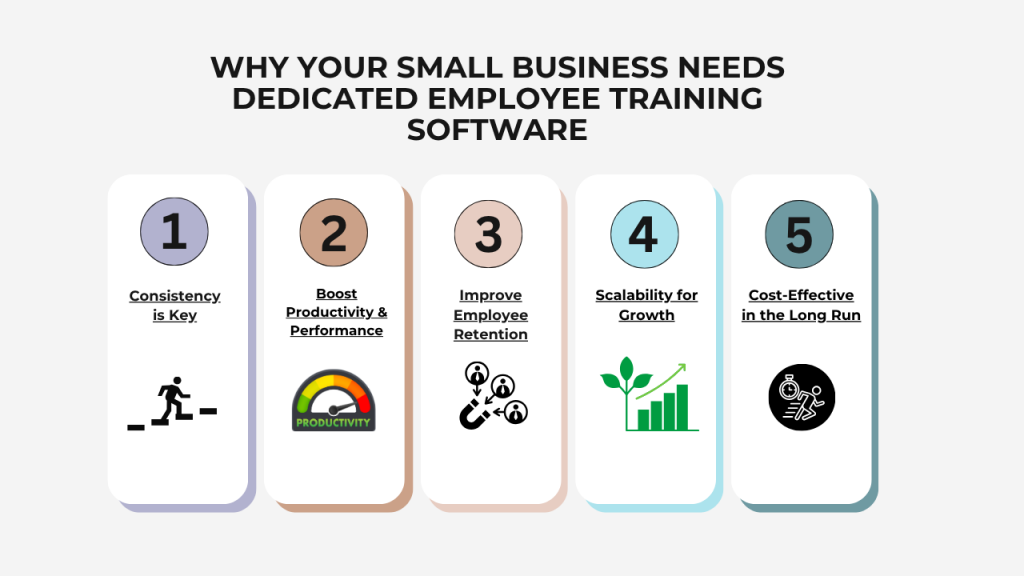 Consistency is Key: When training is delivered through formal software, every employee receives the same high-quality information and follows standardized procedures. This eliminates the inconsistencies that often arise from informal training methods and ensures your entire team operates with the same knowledge base.
Boost Productivity & Performance: Well-trained employees work more efficiently, make fewer mistakes, and require less supervision. They understand not just what to do, but why they’re doing it, leading to better decision-making and problem-solving. Studies show that comprehensive training can improve employee performance by up to 20%.
Improve Employee Retention: When you invest in your employees’ development, you send a clear message that you value their growth. This builds loyalty and significantly reduces turnover. Given that replacing an employee can cost anywhere from 50% to 200% of their annual salary, the retention benefits of good training programs quickly add up.
Scalability for Growth: As your business expands, training software allows you to onboard new hires efficiently without starting from scratch each time. Create your training materials once, and reuse them indefinitely with minimal updates, making growth more manageable and cost-effective.
Cost-Effective in the Long Run: While there’s an upfront investment, training software dramatically reduces long-term costs compared to hiring external trainers, taking key employees away from their work to conduct training, or dealing with the consequences of inadequate training. The time saved alone often justifies the investment within the first year.
Key Criteria for Choosing the Best Training Software
Before diving into specific tools, it’s crucial to understand what separates exceptional training software from mediocre options. Let’s break down the essential criteria you should evaluate.
1. Essential Features for Impactful Training
The right features can mean the difference between training that truly sticks and content that employees quickly forget.
Content Authoring Tools: Your software should enable you to create interactive courses from the ground up, including slides, multimedia elements, and engaging visuals. Look for intuitive interfaces that don’t require technical expertise, allowing subject matter experts on your team to create content directly.
Screen Recording & Video Editing: This is absolutely critical for software training, process documentation, and demonstrating workflows. The ability to capture what’s happening on your screen and turn it into polished training materials saves countless hours and ensures accuracy. Advanced editing capabilities let you add callouts, highlights, and annotations to make your recordings crystal clear.
Interactive Quizzes & Assessments: Passive learning rarely sticks. Your training software should support various question types—multiple choice, fill-in-the-blank, drag-and-drop, matching, and more. These assessments help reinforce learning and provide valuable data on knowledge retention and areas where employees might need additional support.
Templates & Asset Library: Starting from a blank canvas every time is inefficient. Quality training software includes professionally designed templates and a library of assets (icons, characters, buttons) that speed up course creation while maintaining a polished, consistent look.
Export Options (SCORM, xAPI, HTML5): Flexibility in how you deliver your training is essential. Your software should export to industry-standard formats, allowing you to upload courses to a Learning Management System (LMS) if you have one, or distribute them as standalone files that work on any device without special software.
2. Cost & Pricing Models: What to Expect
Understanding the total cost of ownership is crucial for budget-conscious small businesses.
One-Time Purchase (Perpetual License): This model lets you buy the software once and own it forever. While the upfront cost may seem higher, there are no recurring fees, making it ideal for small businesses looking to control long-term expenses. You pay once and can use the software indefinitely, which typically offers better value over time.
Subscription-Based (SaaS): Monthly or annual subscriptions are common for cloud-based solutions. While initial costs appear lower, these fees accumulate significantly over the years. A $50/month subscription costs $600 annually and $3,000 over five years—money that keeps flowing out of your business regardless of how much you use the software.
Hidden Costs: Be wary of expenses beyond the sticker price. Some platforms charge extra for technical support, limit the number of courses or users, require payment for updates, or sell assets and templates separately. Always calculate the total cost of ownership, not just the initial purchase price.
3. Calculating the Return on Investment (ROI)
Understanding ROI helps justify your training software investment and measure its impact on your business.
The ROI Formula: The basic calculation is:
ROI = [(Net Benefits – Cost of Investment) / Cost of Investment] × 100
A positive ROI means your investment is paying off. For example, if you spend $500 on software and save $2,000 in training costs over a year, your ROI is 300%.
How to Measure “Benefits”:
Time Saved: Calculate how much time your current training method requires versus using dedicated software. If you spend 8 hours per new employee on manual training, and software reduces this to 3 hours, multiply those 5 saved hours by your hourly labor cost and the number of employees trained annually.
Increased Productivity: Track performance metrics before and after implementing structured training. This might include sales numbers, customer satisfaction scores, project completion times, or error rates. Even a 5% productivity increase across your team can translate to substantial revenue gains.
Reduced Errors: Monitor the frequency of mistakes, customer complaints, or support tickets before and after training. Fewer errors mean less rework, fewer customer service issues, and better brand reputation. Quantify the cost of errors in your business to understand this benefit clearly.
Lower Employee Turnover: Compare turnover rates before and after implementing comprehensive training programs. Reduced turnover saves thousands in recruitment costs, training time for replacements, and lost productivity during transitions. If your average employee replacement cost is $10,000 and you reduce turnover by just two employees per year, that’s $20,000 in savings.
A Quick Look at the Employee Training Software Market
The training software landscape offers several established players, each with distinct strengths and considerations for small businesses.
Articulate 360 stands out as a comprehensive suite of tools including Storyline and Rise, offering robust features for creating interactive courses. However, its subscription-based model starts at around $1,300 per user annually, making it a significant ongoing expense for small businesses. While powerful, the cost can quickly escalate as your team grows.
iSpring Suite integrates seamlessly with PowerPoint, making it accessible for teams already familiar with Microsoft’s presentation software. It’s user-friendly and offers good functionality, but like Articulate, it operates on a subscription model with annual fees that can strain small business budgets over time.
Adobe Captivate delivers powerful features and extensive capabilities for creating sophisticated eLearning content. However, it comes with a steep learning curve and premium pricing. The interface complexity can intimidate users without technical backgrounds, requiring significant training investment before you can even start creating your employee training materials.
While these tools have their merits, they share common challenges for small businesses: high subscription costs that accumulate over years, complex interfaces that require extensive training, and pricing structures that penalize growth as you add more users. This is where a different approach can offer superior value.
Spotlight: Why ActivePresenter 10 is the Perfect Solution for Small Businesses
While the market offers several powerful tools, many come with steep learning curves and recurring price tags that can strain small business budgets. This is where ActivePresenter 10 shines as the ideal desktop employee training software for small businesses—combining professional-grade capabilities with practical affordability.
All-in-One Powerhouse: More Than Just a Screen Recorder
ActivePresenter 10 isn’t just another screen recording tool—it’s a complete eLearning authoring platform that eliminates the need for multiple software subscriptions.
Professional eLearning Authoring: Create highly interactive courses from scratch with a full-featured authoring environment. Design slides, add multimedia elements, incorporate animations, and build comprehensive training programs that rival anything produced by expensive enterprise software. The intuitive interface means you don’t need a degree in instructional design to create professional-quality content.
Smart Screen Recording: Capture any on-screen activity in two powerful modes. Record as video for demonstrations and presentations, or capture as an interactive simulation where learners can actually click, type, and interact with a software replica. This simulation mode is perfect for software training, allowing employees to practice in a risk-free environment before working with live systems. The software automatically captures every click, keystroke, and mouse movement, converting them into editable objects you can refine and enhance.
Advanced Video & Audio Editing: No need for separate video editing software—ActivePresenter includes a comprehensive built-in editor. Cut and splice recordings, add professional annotations and callouts, apply transitions and effects, reduce background noise, blur sensitive information, add picture-in-picture webcam recordings, and fine-tune audio levels. Everything you need to produce polished, professional training videos is included in one package.
AI-powered Authoring tool: ActivePresenter 10 includes many AI tools to help you build engaging eLearning content and quizzes with AI writing, image generation, text-to-speech, and more.
Designed for Engagement and Retention
Training is only effective if learners actually engage with and retain the information. ActivePresenter 10 includes features specifically designed to boost engagement and ensure knowledge sticks.
13+ Interactive Question Types: Move beyond simple multiple choice with an extensive range of question formats including true/false, fill-in-the-blank, matching, drag-and-drop, hotspot, short answer, essay, and more. This variety keeps assessments interesting and allows you to test understanding in multiple ways, ensuring comprehensive knowledge verification.
Branching Scenarios: Build sophisticated decision-tree training that adapts to learner choices. Create realistic scenarios where employees make decisions and see the consequences, then adjust their approach accordingly. This is invaluable for soft skills training, customer service scenarios, compliance training, and any situation where decision-making is crucial. Learners don’t just memorize information—they practice applying it in context.
Themes, Templates, and AI-Powered Features: ActivePresenter 10 introduces cutting-edge features that dramatically accelerate content creation. The AI Image Generator creates custom visuals based on text descriptions, eliminating the need to search for stock photos. AI Writing assists with script development and content refinement. Text-to-Speech technology generates natural-sounding narration in multiple languages, perfect for creating accessible content or when recording your own voice isn’t practical. Professional themes and templates ensure your courses look polished even if design isn’t your strength.
Unbeatable Value: A Smart Investment
For small businesses watching every dollar, the financial model makes all the difference.
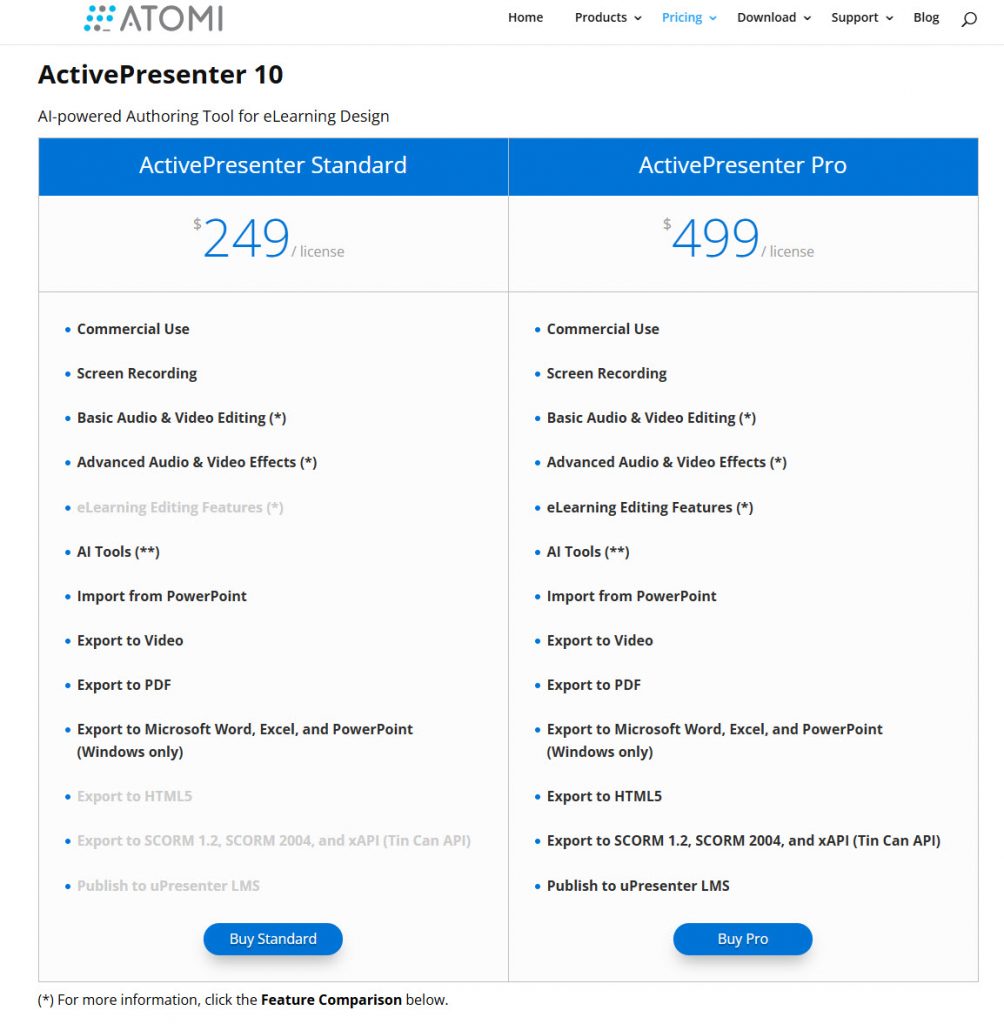 Perpetual License (One-Time Cost): This is ActivePresenter’s biggest advantage for small businesses. Buy it once, own it forever. No monthly bills, no annual renewals, no surprise price increases. While competitors charge $800-$1,300 per year per user indefinitely, ActivePresenter requires a single upfront investment that provides lifetime value. Over five years, this difference amounts to thousands of dollars in savings—money that stays in your business to fuel growth.
No Hidden Fees: The price you see is the price you pay. Updates are included, technical support is provided, and there are no limits on the number of courses you can create or learners you can train. You won’t discover additional charges for “premium” features, asset libraries, or support tickets.
Exceptional ROI: With a low initial investment and comprehensive feature set, ActivePresenter delivers rapid return on investment. Most small businesses recoup their software cost within the first few months through time savings alone. When you factor in improved training effectiveness, reduced turnover, fewer errors, and the ability to scale training without proportional cost increases, the ROI becomes even more compelling. You’re investing in a tool that continues delivering value year after year without additional expense.
Seamless Integration and Export
Training software is only useful if you can actually deliver the content to your employees in a format they can access.
Multiple Output Formats: Export your courses as HTML5 content that runs on any modern device—computers, tablets, and smartphones—with no special software required. Learners simply open the file in a web browser and start training. For organizations using Learning Management Systems, ActivePresenter supports all major standards including SCORM 1.2, SCORM 2004, and xAPI (Tin Can), ensuring full compatibility with your existing infrastructure.
PowerPoint Import: Don’t waste existing resources. ActivePresenter can import PowerPoint presentations and transform them into interactive eLearning courses, adding quizzes, assessments, and multimedia elements to static slides. This feature is invaluable for companies with extensive PowerPoint training materials that need to be modernized and made more engaging.
Publish directly to uPresenter LMS: Since ActivePresenter 10, you can publish your eLearning project directly to uPresenter LMS with just a few clicks.
Real-World Application: See the Difference in Action
Imagine a small marketing agency needing to train a new team member on their CRM software. Traditionally, this meant pulling a senior employee away from billable work for several hours of one-on-one training, during which the new hire frantically takes notes and hopes to remember everything.
With ActivePresenter, the marketing manager spends an hour creating an interactive simulation. They record themselves navigating the CRM, entering client data, generating reports, and managing campaigns. ActivePresenter captures everything as an interactive walkthrough where the new hire can practice each step, make mistakes in a safe environment, and repeat sections as needed until mastery is achieved.
The result? The new employee completes training in half the time, retains information better through hands-on practice, and can reference the training materials whenever questions arise. The senior employee stays focused on client work. And when the agency hires its next employee in three months, the training material is ready to go with zero additional effort. That’s the power of smart training software—you invest time once and benefit repeatedly.
Conclusion: Empower Your Team with ActivePresenter
Small businesses need training solutions that deliver professional results without enterprise-level costs or complexity. As we’ve explored, the right employee training software must balance comprehensive features, intuitive usability, and financial practicality.
The critical criteria—powerful authoring tools, interactive capabilities, flexible export options, and strong ROI—are non-negotiable for effective training that drives real business results. Yet traditional options often force small businesses into expensive subscriptions with accumulating costs or simplified tools that lack the features needed for truly impactful training.
ActivePresenter 10 breaks this compromise by delivering enterprise-grade functionality with small-business-friendly economics. Its perpetual licensing model means you invest once and benefit indefinitely. The all-in-one approach eliminates the need for multiple software subscriptions. The intuitive interface lets you create professional content without extensive training. And the comprehensive feature set—from smart screen recording to AI-powered content creation—ensures your training materials engage learners and drive retention.
For small businesses committed to building skilled, productive teams without breaking the bank, ActivePresenter 10 represents not just a software purchase, but a strategic investment in your company’s human capital and competitive advantage.
Ready to build a more skilled and productive team? Download the free trial of ActivePresenter 10 today and experience the future of employee training for your small business. See firsthand how professional training software can transform your onboarding process, boost performance, and deliver measurable ROI—all without the burden of endless subscription fees.
As an exclusive, long term partner of Atomi Systems, we can offer EXCLUSIVE DISCOUNT COUPON CODE for any ActivePresenter 10 license if you need. Contact us at jackydeals@gmail.com for more information or visit Atomi’s store on our website for more information!