
ActivePresenter 10 vs. iSpring Suite: A Showdown in the eLearning World, and Which One is the Ultimate Choice for You?
 Jacky
Jacky In the world of digital education and corporate training, selecting the right eLearning authoring tool is a pivotal factor that determines the success of an online course. Two prominent names often weighed against each other are ActivePresenter 10 by Atomi Systems and iSpring Suite. Both are powerful elearning authoring software with distinct advantages, but they also possess core differences that can significantly impact your workflow and final product.
This article will delve into a detailed analysis, comparing the strengths and weaknesses of ActivePresenter 10 and iSpring Suite. From there, it will provide practical recommendations to help you confidently decide which tool is the true “perfect match” for your course design needs. We will specifically explain why ActivePresenter 10 is steadily gaining the upper hand and becoming the preferred choice for a wide range of users.

A Quick Overview: Two Opposing Philosophies
Before diving into the details, let’s touch upon the fundamental design philosophies that set these two tools apart:
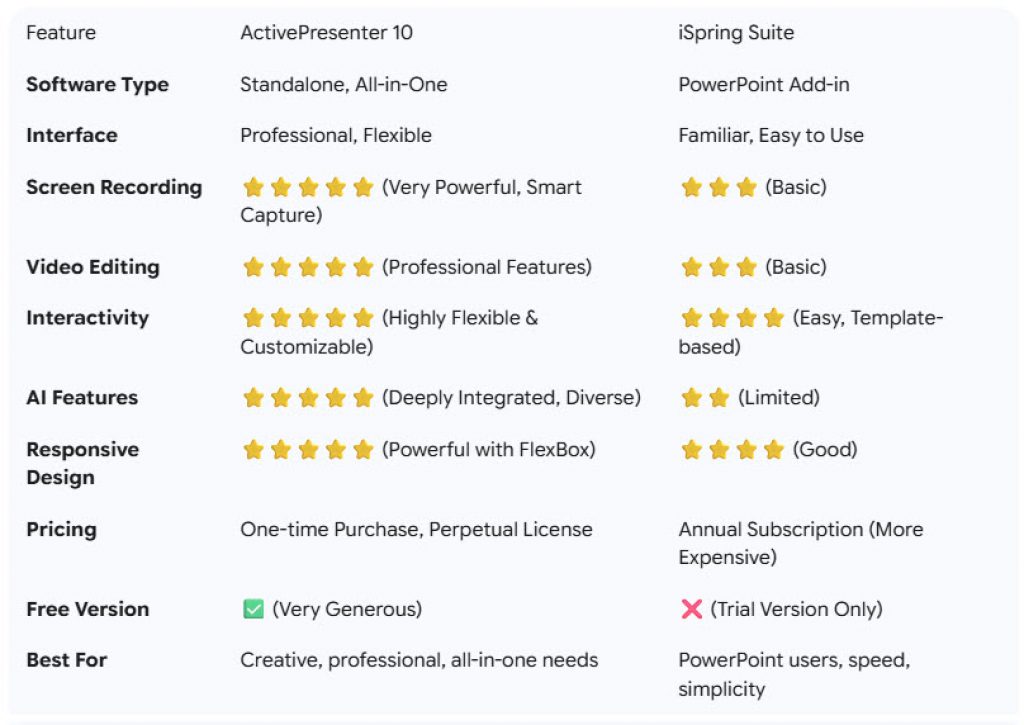
- iSpring Suite: Functions as a powerful add-in within Microsoft PowerPoint. If you are a PowerPoint aficionado and want to quickly convert existing presentations into interactive eLearning courses, iSpring Suite is your efficient, “instant noodle” solution. Like many other tools on the market, iSpring Suite offers subscription based pricing plans. You’ll need to consider annual fee if you want to use the app.
- ActivePresenter 10: Is a standalone, all-in-one software. It’s not just a course authoring tool but also integrates a professional-grade screen recorder, a versatile video editor, and a rich set of interactive design tools. It is a complete eLearning content production studio. No internet is needed. You’re secure when using the software on your desktop. Unlike other software, ActivePresenter offers perpetual licenses for its Standard and Pro editions. This means you only pay once and can use the software forever. There’s no need to worry about recurring annual costs like with other tools.
This foundational difference leads to unique pros and cons for each software, which we will explore right now.
In-Depth Analysis: Weighing ActivePresenter 10 and iSpring Suite
To provide the most objective view, we will compare these two tools based on the criteria most crucial to end-users:
1. User Interface and Learning Curve: Both of them are similar to POWERPOINT Style
- iSpring Suite:
- Strengths: The familiar PowerPoint interface is iSpring’s biggest advantage. Users already proficient in PowerPoint will require almost no time to get acclimated. Everything is within reach, from creating slides and adding effects to incorporating iSpring’s eLearning features through a dedicated tab. This is an excellent choice for those who need speed and simplicity.
- Weaknesses: Its dependency on PowerPoint is also its limitation. You are confined within the framework and constraints of PowerPoint. Deeply customizing interactive objects or creating complex, non-linear scenarios is more challenging.
- ActivePresenter 10:
- Strengths: Offers a professional and flexible workspace. The interface is quite intuitive, resembling popular video editors and graphic design software. You have full control over every object on the slide, from a detailed timeline for each slide and object layer management to setting up complex events and actions. This opens up limitless creative possibilities.
- Weaknesses: For absolute beginners, ActivePresenter’s interface might require a short learning period due to its greater number of features and work panels compared to the straightforward PowerPoint environment. However, this learning curve is not steep and is entirely worth the power it provides.
Recommendation: If your priority is speed, familiarity, and simply converting existing PowerPoint presentations, iSpring Suite is a good option. But if you crave limitless creativity and want to build professional, complex courses from scratch, ActivePresenter 10 is the path you should take.
2. Core Features: Screen Recording and Video Editing
This is where ActivePresenter 10 demonstrates its clear superiority.
- iSpring Suite: Includes a screen recording and video editing tool (iSpring Cam Pro), but it’s quite basic. You can record your screen and webcam, perform simple trims and cuts, and add a few annotations. It’s sufficient for quick tutorial videos but lacks advanced editing features.
- ActivePresenter 10:
- Screen Recording: Extremely powerful, featuring full-motion recording, Smart Capture (which automatically generates step-by-step slides for every mouse/keyboard action), app window locking, and numerous flexible audio recording options.
- Video Editing: This is a full-fledged video editor built right in. You can perform everything from basic to advanced operations: cut, copy, split, change speed, add transitions, zoom-n-pan, apply cursor effects, insert text and graphics, remove green screen backgrounds (chroma key), and notably, utilize advanced audio editing tools like noise reduction and audio normalization.
Recommendation: For creating software tutorials, training videos, or any content that requires screen recording and video editing, ActivePresenter 10 is the undisputed winner. You don’t need a separate video editing program; everything is available in one package.
3. Interactivity and Quiz Design
Both tools provide features for creating interactive eLearning content, but their approach and level of customization differ.
- iSpring Suite:
- Strengths: Offers 14 pre-built question types that are easy to set up and integrate into presentations. Its dialog simulation tool is very intuitive and effective for soft skills training. iSpring also boasts a large Content Library with numerous character templates, backgrounds, and icons to help speed up course design.
- Weaknesses: The customization of interactive objects and questions is limited. You primarily work with pre-made templates. Creating interactive games (gamification) or complex branching scenarios requires significant effort and is sometimes impossible.
- ActivePresenter 10:
- Strengths: Supports 13 common question types, but its real power lies in the Events – Actions and Variables system. This system allows you to create almost any type of interaction imaginable, from simple games and complex branching scenarios to personalizing the learning experience based on learner behavior. The FlexBox and Responsive Design features also ensure your courses display perfectly on any device, from desktops to mobile phones.
- Weaknesses: It doesn’t have as large a built-in asset library as iSpring. However, you can easily import resources from external sources.
Recommendation: If you need simplicity and standard quiz formats, iSpring Suite meets the need well. But if you want to elevate interactivity to a new level, create unique, personalized, and gamified learning experiences, ActivePresenter 10 is the unrivaled tool.
4. Latest AI Features (Updated for 2025)
In the technology race, ActivePresenter 10 has made significant strides by deeply integrating Artificial Intelligence (AI).
- iSpring Suite: Has some AI features like AI-generated narration, but they are not deeply integrated into the workflow.
- ActivePresenter 10: Integrates a comprehensive AI toolkit:
- AI Image Generator: Create unique illustrations directly within the software.
- Text-to-Speech: Features hundreds of natural-sounding voices across multiple languages.
- Auto-Captioning: Automatically recognizes speech and generates subtitles for video and audio.
- AI Writing Assistant: Helps rewrite, summarize, and check the grammar of your course content.
- AI Background Remover: Professionally remove backgrounds from images and videos with a single click.
Recommendation: The AI features in ActivePresenter 10 are not just “gimmicks”; they genuinely save significant time and effort in the content production process and markedly improve course quality. This is a massive competitive advantage.
5. Pricing Model and Licensing
This is a decisive factor for many individuals and organizations.
- iSpring Suite: Operates on an annual subscription model. The price is quite high, especially for individual users or small organizations. You must pay a recurring annual fee to continue using the software.
- ActivePresenter 10: Offers a perpetual license model. You pay once and own that version forever. The price of ActivePresenter is also much more competitive than iSpring Suite. Crucially, ActivePresenter has an incredibly generous Free Edition, which allows you to use most of the core features and only adds a watermark when exporting to advanced formats (HTML5, SCORM, etc.).
Recommendation: From a financial perspective, ActivePresenter 10 is the smarter and more sustainable choice. The one-time purchase model gives you better budget control and avoids recurring costs. The powerful Free Edition is also a huge plus, allowing you to fully experience and learn the software before deciding to invest.
Quick Comparison Chart
Conclusion: Why Should You Choose ActivePresenter 10?
After a comprehensive analysis, it’s clear that iSpring Suite is a good tool for those who want to quickly “eLearning-ify” their PowerPoint presentations without a steep learning curve. It’s fast, convenient, and effective within its scope.
However, if you are looking for a comprehensive, powerful, flexible solution that offers long-term value for your investment, ActivePresenter 10 is clearly the superior choice.
Choose ActivePresenter 10 if you:
- Want an “all-in-one” tool: From screen recording and video editing to designing complex interactive courses, without needing to switch between multiple applications.
- Need high levels of creativity and customization: You want to build unique courses, gamified activities, and not be constrained by pre-made templates.
- Frequently create video tutorials: The professional-grade screen recorder and video editor in ActivePresenter will become your indispensable assistant.
- Want to leverage the power of AI: Smart AI features will help you accelerate your workflow and enhance your product quality.
- Have a reasonable budget and want a sustainable investment: The one-time purchase model and a robust free version make ActivePresenter the most economical and intelligent choice on the market today.
The world of eLearning is constantly evolving. Equipping yourself with a powerful, future-ready tool like ActivePresenter 10 is a wise move to create high-quality, engaging, and effective training content.
This video will show you the latest features available in ActivePresenter 10.
What’s New in ActivePresenter 10