

 Jacky
Jacky In today’s rapidly evolving digital learning landscape, organizations worldwide are seeking powerful authoring tools to create engaging, interactive eLearning content. Among the leading solutions, Articulate Storyline 360 has emerged as one of the most popular and trusted platforms for course development professionals. This comprehensive review examines Storyline 360’s capabilities, strengths, limitations, and market position to help you make an informed decision about whether this tool aligns with your eLearning development needs.
Articulate Storyline 360 is a desktop-based eLearning authoring application that forms part of the broader Articulate 360 suite. Known for its PowerPoint-like interface and extensive customization capabilities, Storyline 360 enables instructional designers and training professionals to create sophisticated, interactive courses without requiring advanced programming skills. The platform has gained significant traction in corporate training, educational institutions, and professional development sectors.
Overview and Core Features of Articulate Storyline 360
What is Articulate Storyline 360?
Articulate Storyline 360 is a slide-based authoring tool designed to create custom, interactive eLearning courses. Unlike traditional presentation software, Storyline 360 offers advanced features specifically tailored for educational content creation, including interactive elements, assessments, simulations, and multimedia integration. The platform operates as a desktop application for Windows systems and integrates seamlessly with the broader Articulate 360 ecosystem.
Key Features and Capabilities
Interactive Content Creation Storyline 360 excels in creating dynamic, interactive learning experiences. Users can easily add buttons, sliders, dials, hotspots, and markers to slides, transforming static content into engaging interactive elements. The platform’s trigger system allows for complex branching scenarios and personalized learning paths based on user choices and performance.
Multimedia Integration The software supports comprehensive multimedia integration, including videos, audio files, animations, and interactive graphics. Users can record screen activities directly within the application, import various media formats, and create software simulations with minimal effort. The built-in screen recording functionality is particularly valuable for creating training content around software applications.
Assessment and Quiz Creation Storyline 360 provides robust assessment capabilities with over 25 question types, from basic multiple-choice to complex drag-and-drop interactions. The platform includes result slides, feedback mechanisms, and scoring options that integrate with Learning Management Systems (LMS) through SCORM, xAPI, cmi5, and AICC standards.
Responsive Design and Mobile Compatibility The platform features a responsive player that automatically adapts content to different screen sizes and orientations. Courses created in Storyline 360 work seamlessly across desktop computers, tablets, and smartphones without requiring manual adjustments for different devices.
AI-Powered Enhancement Recent updates have integrated AI Assistant functionality, enabling users to generate content, improve writing tone, check grammar, and create custom images. This AI integration helps accelerate course development while maintaining quality and consistency.
Collaboration Features Through integration with the Articulate 360 ecosystem, Storyline users can access shared slide libraries, collaborate on projects through cloud storage, and streamline the review process using the web-based Review app for stakeholder feedback.
Content Library and Assets
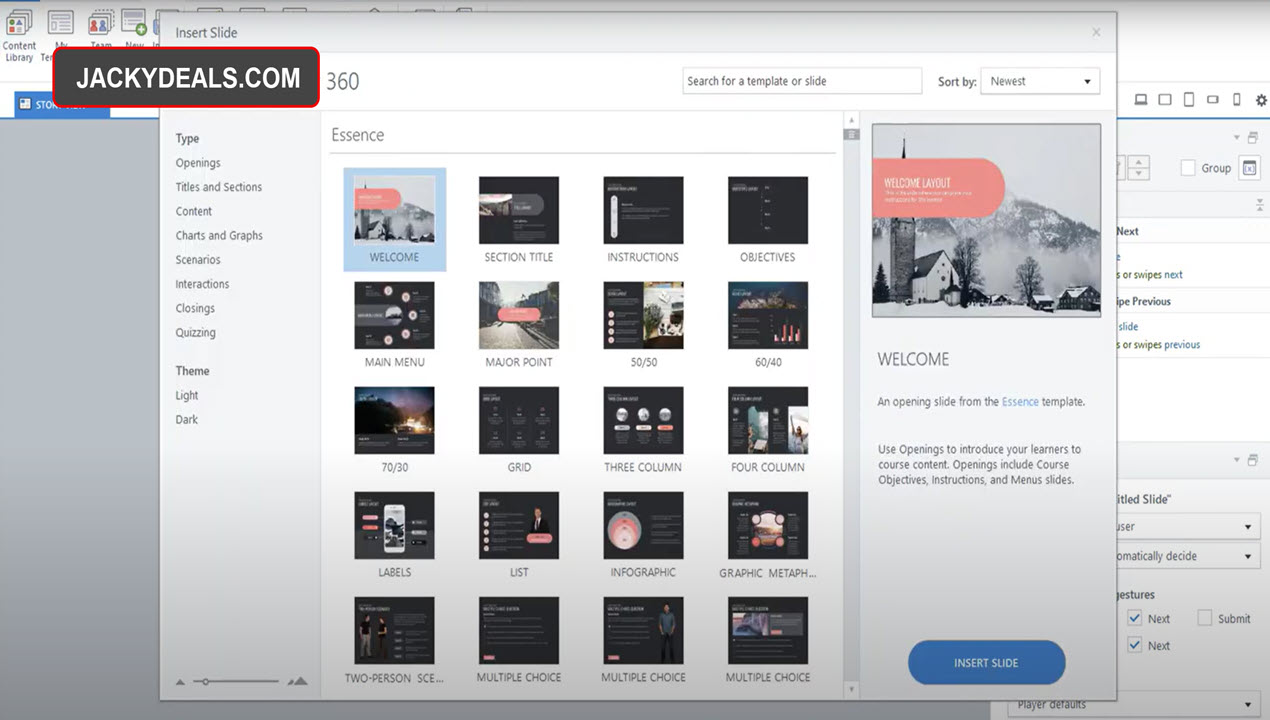
Storyline 360 provides access to an extensive content library featuring over 12 million royalty-free assets, including photographs, illustrations, icons, videos, and customizable slide templates. The library also includes diverse character sets that can be used to create relatable scenarios and branching interactions. All assets are professionally designed and require no attribution, significantly reducing content development time.
Strengths and Advantages of Articulate Storyline 360
Exceptional Customization Capabilities
One of Storyline 360’s greatest strengths lies in its extensive customization options. Unlike template-based authoring tools, Storyline provides developers with granular control over every element of their courses. Users can modify object states, create complex animations using motion paths, and build sophisticated interactions using the trigger system. This level of customization enables the creation of truly unique learning experiences that can match specific brand requirements and learning objectives.
User-Friendly Interface
Despite its powerful capabilities, Storyline 360 maintains an intuitive, PowerPoint-like interface that reduces the learning curve for new users. The familiar ribbon-based navigation and drag-and-drop functionality make it accessible to users without extensive technical backgrounds. The timeline-based editing system provides clear visual feedback, making it easy to coordinate animations, audio, and interactive elements.
 Comprehensive Assessment Options
The platform’s assessment capabilities are particularly impressive, offering flexibility in how learning is measured and tracked. Beyond standard quiz formats, Storyline enables the creation of scenario-based assessments, simulations, and performance-based evaluations. The ability to combine results from multiple quizzes and create custom feedback mechanisms provides instructional designers with powerful tools for measuring learning effectiveness.
Strong Technical Foundation
Storyline 360 demonstrates excellent technical reliability with robust publishing options that ensure courses work consistently across different browsers and devices. The HTML5 output provides modern compatibility, while SCORM compliance ensures seamless integration with most LMS platforms. The software includes automatic save functionality and recovery options that protect against data loss.
Active Community and Support
Articulate maintains one of the most vibrant communities in the eLearning industry, with over 1.5 million members sharing knowledge, resources, and best practices. The company provides comprehensive support through documentation, video tutorials, live webinars, and responsive customer service. This ecosystem significantly enhances the user experience and accelerates skill development.
Advanced Accessibility Features
Storyline 360 prioritizes accessibility with built-in support for WCAG 2.1 Level AA standards. The platform includes screen reader compatibility, keyboard navigation, closed captioning capabilities, and accessible feedback layers. These features ensure that courses can reach learners with diverse needs and help organizations meet compliance requirements.
Limitations and Weaknesses of Articulate Storyline 360
Steep Learning Curve for Advanced Features
While Storyline 360’s basic functionality is accessible to beginners, mastering its advanced features requires significant time investment. Complex interactions involving variables, triggers, and states can be challenging for users without technical backgrounds. The extensive feature set, while powerful, can overwhelm new users and slow initial productivity.
Platform Limitations
Storyline 360 is exclusively designed for Windows systems, which can be problematic for organizations using Mac-based workflows. While workarounds exist through virtual machines or Parallels Desktop, these solutions add complexity and may impact performance. The lack of native web-based authoring limits collaboration flexibility compared to fully cloud-based alternatives.
File Size and Performance Concerns
Projects with extensive multimedia content, particularly those including multiple videos or high-resolution images, can become quite large and potentially impact performance. Some users report slow loading times and responsiveness issues when working with complex projects. Screen recordings and simulations, while powerful, can significantly increase file sizes and complicate content management.
Responsive Design Limitations
Although Storyline 360 includes responsive player functionality, it doesn’t offer true responsive design capabilities. Content maintains fixed layouts that scale rather than reflow for different screen sizes. This can result in suboptimal viewing experiences on mobile devices, particularly for courses with dense information or small interactive elements.
Video Compression Issues
The platform’s automatic video compression during publishing can sometimes reduce quality, particularly for high-definition content. While this helps manage file sizes, it can be problematic for courses requiring precise visual detail. Users must often implement workarounds by manually replacing compressed videos in published output.
Limited Collaboration Features
While Storyline integrates with Articulate 360’s collaboration tools, real-time co-authoring capabilities are limited compared to fully web-based platforms. Multiple users cannot simultaneously edit the same project, and version control can become complex in team environments without careful management.
Pricing and Licensing
Subscription Model
Articulate has transitioned to a subscription-only model with Storyline 360 available exclusively as part of the Articulate 360 suite. As of 2025, pricing structures include:
Personal Plans:
- Articulate 360 Standard: $1,199 per user annually
- Articulate 360 AI: $1,449 per user annually (includes enhanced AI features)
Team Plans:
- Articulate 360 Standard (Teams): $1,499 per user annually
- Articulate 360 AI (Teams): $1,749 per user annually
Educational Discounts: Academic institutions can receive significant discounts, typically around 50% off standard pricing, making the platform more accessible for educational use.
Value Proposition
The subscription model includes access to the entire Articulate 360 suite, including Rise 360, Content Library, Review app, translation services, and regular updates. While the annual cost represents a significant investment, particularly for individual users or small organizations, the comprehensive feature set and included resources can provide substantial value for active course developers.
Cost Considerations
Organizations should carefully evaluate their usage patterns and development volume when considering Storyline 360. The annual subscription requirement means that seasonal or project-based users may find the cost challenging to justify. However, for organizations with ongoing eLearning development needs, the platform’s capabilities and time-saving features often offset the subscription cost.
Target Audience and Use Cases of Articulate Storyline 360
Ideal Users
Corporate Training Departments: Organizations with dedicated training teams benefit significantly from Storyline 360’s advanced capabilities and customization options. The platform’s ability to create branded, interactive content that integrates with existing LMS infrastructure makes it particularly valuable for large-scale corporate training initiatives.
Instructional Design Professionals: Experienced instructional designers appreciate Storyline’s flexibility and power for creating sophisticated learning experiences. The platform provides the tools necessary to implement complex learning theories and create highly engaging, measurable training programs.
Educational Institutions: Schools and universities use Storyline 360 to create interactive course content, virtual labs, and assessment tools. The educational discounts and accessibility features make it particularly attractive for academic environments.
eLearning Agencies: Professional eLearning development companies rely on Storyline’s customization capabilities to create unique solutions for diverse clients. The platform’s professional output and extensive feature set support the creation of high-quality, billable training content.
Less Suitable For
Individual Educators: Teachers or independent trainers with limited budgets may find the annual subscription cost prohibitive, especially if they only occasionally create digital content.
Simple Content Creation: Organizations needing basic, template-driven courses might find Storyline overly complex and expensive compared to simpler alternatives.
Mac-Only Environments: Organizations exclusively using Mac systems face significant technical challenges in implementing Storyline 360.
Installation and Getting Started
System Requirements
Storyline 360 requires Windows 10 or later, with at least 4GB of RAM (8GB recommended) and 4GB of available hard disk space. A reliable internet connection is necessary for accessing cloud features, content library, and software updates. The application integrates with common office software and supports various multimedia formats out of the box.
Installation Process
Installation is straightforward through the Articulate 360 desktop app, which manages all suite applications. Users download the desktop app from their Articulate account, select Storyline 360 for installation, and can begin creating content immediately. The installation includes access to templates, sample projects, and getting-started resources.
Learning Resources
Articulate provides extensive onboarding resources, including:
- Interactive tutorials built into the software
- Comprehensive video library covering basic to advanced techniques
- Sample projects demonstrating best practices
- Community forums with peer support
- Regular live training sessions and webinars
New users can typically create basic courses within hours of installation, though mastering advanced features requires ongoing practice and learning.
Market Position and Competitive Analysis
Market Leadership
Articulate Storyline 360 holds a dominant position in the eLearning authoring market, with approximately 6.82% market share in the education technology sector according to recent analytics. The platform serves over 120,000 customers globally, including major corporations like Oracle, Wells Fargo, Amazon, and Morgan Stanley. This market presence reflects the platform’s reliability and enterprise-grade capabilities.
Key Competitors
Adobe Captivate: Offers similar advanced authoring capabilities with strong simulation features but has a steeper learning curve and higher complexity. Captivate provides more technical control but lacks Storyline’s user-friendly approach.
iSpring Suite: Integrates directly with PowerPoint, making it more accessible for users familiar with Microsoft’s presentation software. While easier to learn, it offers fewer advanced interaction capabilities than Storyline.
Elucidat: Provides cloud-based authoring with strong collaboration features but at a significantly higher price point. The platform focuses on enterprise scalability rather than individual flexibility.
Lectora: Offers advanced programming capabilities and extensive customization but requires more technical expertise than Storyline.
Competitive Advantages
Storyline 360’s success stems from its balanced approach between power and usability. While competitors may excel in specific areas, Storyline provides the most comprehensive combination of features, ease of use, and market support. The extensive content library, active community, and regular feature updates maintain its competitive edge.
User Experience and Performance
Interface and Usability
The PowerPoint-inspired interface makes Storyline 360 immediately familiar to most business users. The ribbon-based navigation, slide sorter, and properties panels provide logical organization of tools and features. The timeline editor offers precise control over animations and interactions while remaining visually intuitive.
However, the interface can feel crowded when working with complex projects involving multiple layers, triggers, and states. Advanced users often request improved organization of the triggers panel and better visualization of project structure for complex branching scenarios.
Performance Characteristics
Storyline 360 generally performs well on modern hardware, though performance can degrade with very large projects or extensive multimedia content. The software handles typical corporate training projects efficiently, but users should be mindful of file organization and media optimization for optimal performance.
Rendering and publishing times vary significantly based on project complexity and chosen output formats. Simple courses publish quickly, while multimedia-heavy or complex interactive projects may require several minutes for full compilation.
Reliability and Stability
The platform demonstrates good stability under normal usage conditions, with automatic save functionality protecting against unexpected crashes. However, users working with large projects or extensive screen recordings should implement regular manual saves and project backups.
Recent updates have improved memory management and reduced crashes, though some users still experience occasional stability issues when working with very complex projects or multiple large media files.
Future Outlook and Development
AI Integration Trends
Articulate continues investing heavily in AI-powered features, with the AI Assistant functionality representing just the beginning of intelligent content creation capabilities. Future developments likely include more sophisticated content generation, automated accessibility checking, and intelligent course optimization suggestions.
Platform Evolution
The company appears committed to maintaining Storyline’s position as a desktop application while enhancing cloud integration and collaboration features. This hybrid approach balances the performance advantages of desktop software with modern collaboration and sharing requirements.
Industry Positioning
As the eLearning market continues expanding, Storyline 360’s comprehensive feature set and established market position provide strong foundations for continued growth. The platform’s ability to evolve with changing industry needs while maintaining backward compatibility supports long-term user investment.
Conclusion and Recommendations
Overall Assessment
Articulate Storyline 360 represents the gold standard for custom eLearning development, offering an exceptional combination of power, flexibility, and usability. The platform successfully balances advanced capabilities with accessibility, making sophisticated eLearning development achievable for users across different skill levels.
The software’s extensive feature set, comprehensive asset library, and strong community support create significant value for organizations committed to high-quality training development. While the subscription cost represents a meaningful investment, the platform’s capabilities and time-saving features often justify the expense for active course developers.
Who Should Choose Storyline 360
Highly Recommended For:
- Organizations with ongoing eLearning development needs
- Instructional design professionals seeking maximum creative control
- Corporate training departments requiring branded, interactive content
- Educational institutions with technical support resources
- eLearning agencies serving diverse client requirements
Consider Alternatives If:
- Budget constraints make annual subscriptions challenging
- Content needs are simple and template-driven
- Mac-only environment without Windows virtualization options
- Occasional or project-based development needs
- Limited technical support availability
Final Verdict
Articulate Storyline 360 earns strong recommendation for organizations seeking a professional, full-featured eLearning authoring solution. Despite certain limitations around platform compatibility and learning curve challenges, the software’s comprehensive capabilities, market-leading support, and continuous innovation make it an excellent long-term investment for serious eLearning development.
The platform’s ability to create engaging, accessible, and effective learning experiences positions it as a valuable tool for modern training and education initiatives. Organizations willing to invest in the learning curve and annual subscription will find Storyline 360 capable of supporting their most ambitious eLearning projects while providing the flexibility to evolve with changing requirements.
For those beginning their eLearning journey or with simpler needs, exploring alternatives like Rise 360 (also included in the Articulate 360 suite) or other platforms may provide better initial value. However, for users requiring the full spectrum of custom eLearning capabilities, Storyline 360 remains the industry benchmark against which other authoring tools are measured.




![How to Purchase ActivePresenter 10 for the Best Price? [Updated 20% Off Discount Codes/Promotions]](https://jackydeals.com/wp-content/uploads/2025/10/ActivePresenter-10-Coupon-Codes.png)