

 Jacky
Jacky The corporate training landscape has undergone a seismic shift. According to recent Accenture research, companies with inadequate training programs hemorrhage an average of $13.5 million annually due to employee disengagement and critical skill gaps. Yet despite this staggering cost, 73% of organizations continue relying on outdated training methods that fail to engage today’s digital-native workforce.
Here’s the reality check: employees retain only 10% of information from traditional instructor-led training, but interactive e-learning can boost retention rates to 75%. The right e-learning authoring tool doesn’t just digitize your training—it transforms learning outcomes while cutting development costs by up to 60% and reducing time-to-market by 4x.
But here’s the challenge. With over 100 eLearning authoring tools flooding the market, making the wrong choice can cost you months of productivity, thousands in licensing fees, and most critically, the opportunity to upskill your workforce when it matters most.
This comprehensive guide cuts through the noise by analyzing 15+ leading authoring tools across four strategic tiers. You’ll get ROI calculations, implementation roadmaps, real-world case studies, and the decision frameworks Fortune 500 companies use to select their training technology stack.
Whether you’re a startup launching your first training program or an enterprise scaling global learning initiatives, this guide provides the strategic intelligence you need to make the right choice—the first time.
Executive Summary & Strategic Decision Framework
The Market Landscape at a Glance
The e-learning authoring market has evolved beyond simple content creation tools. Today’s solutions integrate AI-powered content generation, advanced analytics, collaborative workflows, and seamless LMS integration. The key is understanding which capabilities align with your organization’s learning maturity and strategic goals.
Comprehensive Comparison Matrix
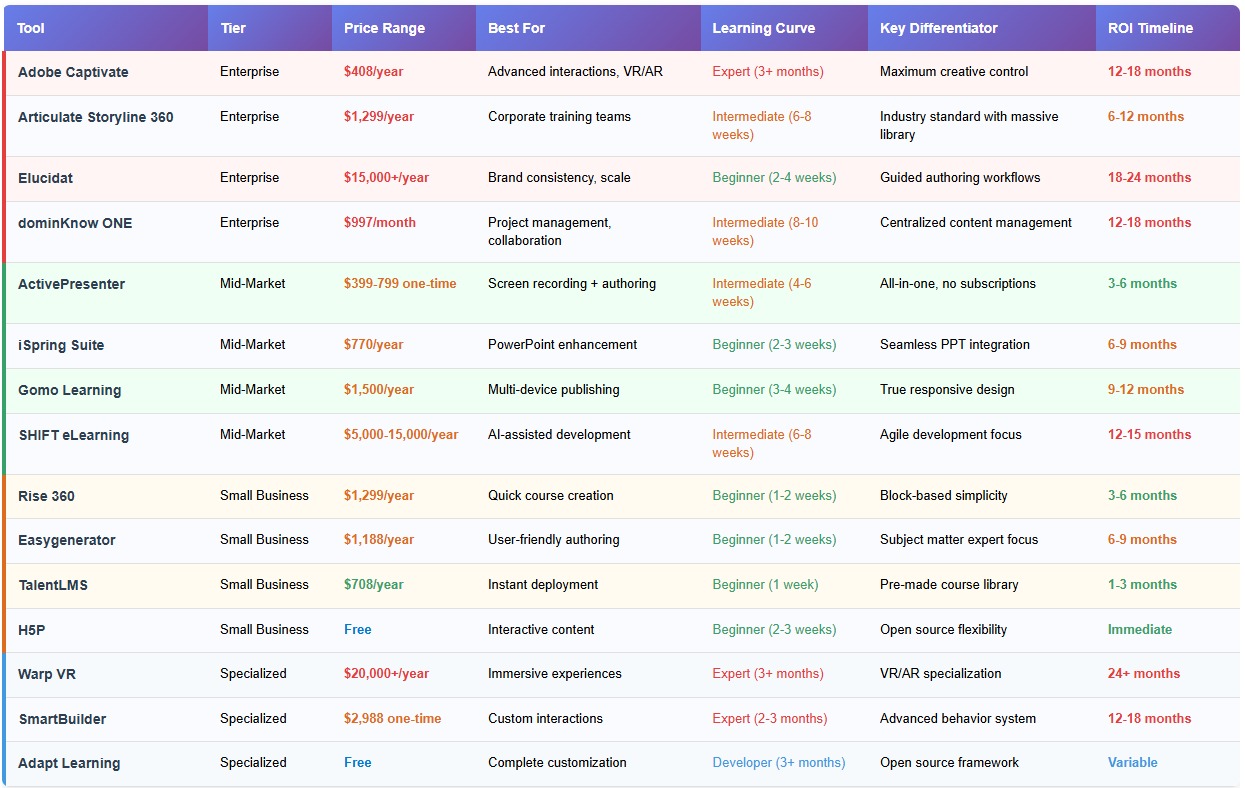
Strategic Decision Tree
- Budget > $15,000/year + Large Teams (10+ authors)? → Enterprise Tier: Adobe Captivate, Articulate Storyline 360, Elucidat
- Budget $2,000-$15,000/year + Medium Teams (3-10 authors)? → Mid-Market Tier: ActivePresenter, iSpring Suite, Gomo Learning
- Budget < $2,000/year + Small Teams (1-3 authors)? → Small Business Tier: Rise 360, TalentLMS, Easygenerator
- Unique Requirements (VR, Custom Development)? → Specialized Tier: Warp VR, SmartBuilder, Adapt Learning
ROI Quick Calculator Framework
Annual Training Costs Without Authoring Tool:
- External development: $25,000-$100,000
- Internal design time: $15,000-$50,000
- Update/maintenance: $10,000-$30,000
- Total: $50,000-$180,000
Annual Costs With Authoring Tool:
- Tool licensing: $1,000-$20,000
- Training/setup: $2,000-$10,000
- Internal authoring time: $5,000-$25,000
- Total: $8,000-$55,000
Potential Annual Savings: $42,000-$125,000 Typical ROI: 150-400% in year one
Tier 1: Enterprise Solutions – Maximum Power & Scalability
Enterprise authoring tools are designed for organizations with complex learning requirements, large authoring teams, and substantial budgets. These solutions offer advanced customization, robust project management, and enterprise-grade security features that justify their premium pricing.
1. Adobe Captivate – The Creative Powerhouse
Best for: Large enterprises requiring maximum design flexibility and cutting-edge interactive experiences
Adobe Captivate stands alone in the authoring tool ecosystem as the most technically sophisticated solution available. Built on the same foundation as Adobe’s creative suite, it offers unparalleled design freedom for instructional designers who refuse to compromise on visual excellence.
What Sets It Apart: The platform’s native VR/AR capabilities allow organizations to create immersive learning experiences that were previously impossible without specialized development teams. Its advanced branching scenarios and conditional logic systems enable the creation of adaptive learning paths that respond to individual learner performance in real-time.
Advanced Capabilities:
- Responsive authoring: True responsive design that adapts content layout based on device capabilities, not just screen size
- Advanced animations: Timeline-based animation system rivaling professional motion graphics software
- Geolocation integration: Location-aware training modules for field-based learning
- Advanced analytics: Detailed learner interaction tracking with heat mapping and engagement scoring
Enterprise Integration: Captivate seamlessly integrates with Adobe Experience Cloud, enabling sophisticated learner journey mapping and personalization at scale. Its API-first architecture supports complex enterprise workflows and custom integrations with HRIS and performance management systems.
Real-World Success Story: A Fortune 100 pharmaceutical company used Captivate to create FDA-compliant training simulations that reduced new employee certification time from 6 months to 3 months, while improving compliance test scores by 34%.
Investment Considerations:
- Pricing: $33.99/month per user (annual commitment)
- Implementation time: 3-6 months for full deployment
- Training requirement: 40-80 hours for author proficiency
- ROI timeline: 12-18 months for most organizations
Ideal Use Cases:
- Complex compliance training with branching scenarios
- Technical product simulations requiring precise interactions
- Immersive safety training with VR components
- Advanced assessment engines with adaptive questioning
2. Articulate Storyline 360 – The Industry Standard
Best for: Corporate training teams seeking proven reliability with extensive community support
Articulate Storyline 360 has earned its position as the corporate e-learning industry standard through consistent innovation and an unwavering focus on instructional designer workflows. Its trigger-based interaction system democratizes advanced course logic, allowing designers to create sophisticated learning experiences without programming expertise.
The Storyline Advantage: What distinguishes Storyline is its perfect balance of power and usability. The trigger-based system uses natural language logic (“When user clicks Button A, show Layer B”) that makes complex interactions accessible to designers with varying technical backgrounds.
Content Library Excellence: The included Content Library 360 provides access to over 13 million stock photos, illustrations, icons, and characters—a collection that would cost tens of thousands of dollars if purchased separately. The diverse character library includes authentic representations across ethnicities, ages, and professions, crucial for creating inclusive learning experiences.
Collaboration & Workflow: Review 360 transforms the feedback process with time-stamped comments directly on course content, eliminating the email chains and version confusion that plague many development projects. The integration with Rise 360 allows teams to seamlessly combine rapid development with advanced interactions.
Enterprise Features:
- Advanced state management: Sophisticated variable systems for tracking learner progress across complex learning paths
- Accessibility compliance: Built-in tools for Section 508 and WCAG 2.1 AA compliance
- Brand consistency tools: Master slide templates and style guides ensure organizational brand standards
- Advanced publishing: Multiple output formats including SCORM 1.2/2004, xAPI, and cmi5
Market Intelligence: Articulate’s annual conference, Articulate Live, draws over 5,000 attendees, indicating the strength of its professional community. This ecosystem provides invaluable peer learning opportunities and ensures long-term platform sustainability.
Investment Analysis:
- Pricing: $1,299/user/year (includes full Articulate 360 suite)
- Time to productivity: 6-8 weeks for intermediate proficiency
- Community support: 250,000+ active community members
- Market share: 65% of Fortune 500 companies
Strategic Advantages:
- Extensive marketplace of templates and interactions
- Regular feature updates and innovation roadmap
- Strong reseller network providing local support
- Integration with major LMS platforms
3. Elucidat – The Scalability Specialist
Best for: Large organizations prioritizing content governance, brand consistency, and subject matter expert enablement
Elucidat revolutionizes enterprise content creation by enabling subject matter experts to contribute directly to course development while maintaining strict quality and brand standards. Its guided authoring approach reduces the bottleneck of centralized instructional design teams.
Guided Authoring Innovation: The platform’s signature feature transforms content creation from a specialist activity into a collaborative process. Subject matter experts work within pre-approved templates and workflows that automatically enforce brand guidelines, accessibility standards, and instructional design best practices.
Enterprise Governance: Elucidat’s approval workflows and version control systems meet enterprise-grade requirements for content governance. Multi-level approval chains ensure content accuracy while maintaining development velocity.
Global Deployment Capabilities:
- Multi-language support: Native support for 75+ languages with professional translation workflows
- Regional customization: Content variations for different markets while maintaining core messaging
- Brand template system: Centrally managed templates ensure global brand consistency
- Analytics dashboard: Executive-level reporting on content performance and learner engagement
Scalability Architecture: The platform’s cloud-native design handles organizations with thousands of authors across multiple time zones. Its elastic infrastructure automatically scales to handle peak usage periods without performance degradation.
Business Impact Metrics: Organizations typically see 50% reduction in content development time and 75% improvement in content consistency scores within six months of implementation.
Investment Framework:
- Pricing: Custom pricing starting at $15,000/year (volume discounts available)
- Implementation: 8-12 weeks including template development
- Training: 2-4 weeks for subject matter expert certification
- Support: Dedicated customer success manager included
Enterprise Integration:
- SSO integration with Active Directory and LDAP
- API connectivity for HRIS and performance management systems
- Advanced analytics export for business intelligence platforms
- Custom branding and white-label options
4. dominKnow ONE – The Project Management Powerhouse
Best for: Organizations requiring sophisticated project management, centralized asset management, and multi-format publishing
dominKnow ONE transcends traditional authoring by providing a comprehensive content lifecycle management platform. Its strength lies in coordinating complex projects involving multiple authors, reviewers, and stakeholders while maintaining strict version control and approval workflows.
Centralized Asset Management: The platform’s digital asset management system ensures content consistency across all projects while enabling efficient reuse of approved materials. Version control extends beyond courses to individual assets, preventing the confusion common in large content development initiatives.
Multi-Format Publishing Excellence: One course, multiple outputs—dominKnow ONE publishes content simultaneously to SCORM, xAPI, mobile apps, and print formats from a single source, eliminating the redundant work typical of multi-format content strategies.
Advanced Project Management:
- Resource allocation tracking: Monitor author workloads and project timelines
- Dependency management: Automatic alerts when prerequisite content changes affect downstream projects
- Custom approval workflows: Configurable review processes matching organizational hierarchies
- Real-time collaboration: Multiple authors can work on different sections simultaneously
Enterprise Analytics: The platform provides project managers with unprecedented visibility into content development efficiency, author productivity, and content performance post-deployment.
Strategic Value Proposition:
- Pricing: $997/author/month with enterprise volume discounts
- ROI drivers: 40% reduction in project management overhead, 60% faster content updates
- Implementation: 6-8 weeks including workflow customization
- Support: Dedicated implementation specialist and ongoing account management
Ideal Implementation Scenarios:
- Government agencies with complex approval requirements
- Healthcare organizations managing regulatory compliance content
- Manufacturing companies with safety-critical training materials
- Financial services with audit trail requirements
Tier 2: Mid-Market Solutions – Optimal Value & Versatility
Mid-market authoring tools offer the sweet spot of professional features, reasonable pricing, and manageable learning curves. These solutions serve the majority of organizations that need more than basic authoring capabilities but don’t require enterprise-level complexity.
5. ActivePresenter – The All-in-One Game Changer
Best for: Organizations transitioning from PowerPoint to interactive e-learning while requiring professional screen recording capabilities
ActivePresenter stands as the most compelling value proposition in the mid-market tier, uniquely combining professional screen recording, video editing, and comprehensive course authoring in a single, cost-effective solution. While competitors force organizations to choose between specialized screen recorders and authoring tools, ActivePresenter delivers both at a fraction of the combined cost.
The Integration Advantage: Unlike the typical workflow requiring separate tools for screen recording (Camtasia), video editing (Premiere), and course authoring (Storyline), ActivePresenter provides an integrated environment where screen recordings seamlessly become interactive course elements. This integration eliminates file format conversions, reduces quality loss, and dramatically accelerates development timelines.
Screen Recording Excellence: ActivePresenter’s screen recording capabilities rival dedicated tools like Camtasia and ScreenFlow. Advanced features include smart cursor highlighting, automatic zoom effects, and real-time annotation—all while capturing at ultra-high resolutions suitable for modern 4K displays.
Professional Video Editing: The built-in video editor includes advanced features typically found in dedicated video editing software:
- Multi-track timeline with unlimited layers
- Advanced color correction and audio enhancement
- Motion graphics and animation tools
- Green screen (chroma key) capabilities for professional presentations
Interactive Authoring Capabilities: Beyond screen recording, ActivePresenter provides full authoring functionality:
- Advanced interactions: Drag-and-drop, hotspots, click-and-reveal scenarios
- Assessment engine: Comprehensive quiz types with detailed scoring algorithms
- Responsive design: True responsive output optimized for all devices
- SCORM compliance: Full SCORM 1.2, 2004, and xAPI support for seamless LMS integration
Financial Model Advantage: ActivePresenter’s one-time purchase model provides exceptional long-term value. While subscription-based competitors can cost $8,000-$15,000 over five years, ActivePresenter’s total cost remains under $1,000 for the same period.
Real-World Performance Metrics: Organizations migrating to ActivePresenter report:
- 40% faster course creation compared to multi-tool workflows
- 65% reduction in annual software costs compared to subscription models
- 50% improvement in video quality consistency across training materials
- 30% reduction in technical support issues due to integrated workflow
Technical Specifications:
- Output formats: HTML5, MP4, AVI, WMV, PDF, SCORM packages
- Project management: Built-in collaboration tools and review workflows
- Accessibility: Section 508 and WCAG 2.1 compliance tools
- Integration: API support for custom LMS integration and workflow automation
Competitive Positioning: When compared to similar-featured combinations (Camtasia + Storyline + video editor), ActivePresenter provides 80% of the functionality at 20% of the cost, with the added benefit of seamless workflow integration.
Investment Analysis:
- Pricing: $199 (Standard) to $399 (Pro) one-time purchase
- Learning curve: 2-3 weeks for full proficiency
- ROI timeline: 3-6 months (fastest in category)
- Update policy: Free updates for major versions, minimal upgrade costs
Perfect Fit Organizations:
- Software companies creating product training and documentation
- Consulting firms developing client training materials
- Mid-market companies transitioning from PowerPoint-based training
- Educational institutions requiring budget-conscious professional tools
- Teams of 3-10 authors seeking to eliminate ongoing subscription costs
Implementation Strategy: ActivePresenter excels in phased implementations where organizations can start with screen recording needs and gradually expand into full course authoring, making it ideal for teams testing e-learning initiatives before major commitments.
6. iSpring Suite – The PowerPoint Bridge
Best for: Organizations with extensive PowerPoint investments seeking to enhance existing presentations with interactive elements
iSpring Suite represents the most seamless transition from traditional presentation-based training to interactive e-learning. By working directly within PowerPoint’s familiar interface, it eliminates the learning curve barriers that often derail e-learning initiatives.
PowerPoint Integration Mastery: iSpring Suite doesn’t just export PowerPoint presentations—it transforms them into interactive learning experiences while preserving all original formatting, animations, and design elements. This approach protects existing content investments while adding professional e-learning capabilities.
Character Builder Innovation: The platform includes access to over 68,000 professional characters across diverse demographics, industries, and scenarios. These characters can be customized with different poses, expressions, and clothing, enabling organizations to create inclusive, representative training content without expensive custom illustration work.
AI-Powered Assistance: iSpring’s AI assistant accelerates content development by:
- Automatically generating quiz questions from existing content
- Suggesting interactive elements based on content analysis
- Providing real-time accessibility compliance checking
- Creating closed captions and transcripts for video content
Advanced Assessment Engine: The quiz and assessment tools extend far beyond basic multiple choice, including:
- Scenario-based assessments: Real-world problem-solving evaluations
- Adaptive questioning: Difficulty adjusts based on learner performance
- Advanced scoring: Weighted scoring with partial credit options
- Detailed analytics: Question-level performance analysis for content optimization
Mobile Learning Optimization: Content automatically adapts to mobile devices with touch-optimized interactions and offline capability, ensuring consistent learning experiences across all platforms.
Business Value Proposition:
- Pricing: $770/author/year (volume discounts available)
- Time to productivity: 2-3 weeks for PowerPoint users
- Content migration: Existing presentations convert in minutes, not hours
- Training requirement: Minimal for teams familiar with PowerPoint
Enterprise Features:
- Brand consistency: Master templates ensure organizational standards
- Collaboration tools: Real-time co-authoring and review workflows
- LMS integration: Seamless connectivity with 150+ learning management systems
- Analytics dashboard: Comprehensive learner performance tracking
ROI Acceleration Factors: Organizations choosing iSpring Suite typically achieve ROI 50% faster than other authoring tools due to the ability to immediately leverage existing PowerPoint content rather than starting from scratch.
7. Gomo Learning – The Multi-Device Specialist
Best for: Organizations prioritizing mobile learning experiences and cloud-based team collaboration
Gomo Learning pioneered true responsive e-learning design, creating content that doesn’t just resize for different screens but fundamentally adapts its interaction model based on device capabilities. This approach ensures optimal learning experiences whether accessed on desktop computers, tablets, or smartphones.
Responsive Design Leadership: Unlike tools that simply scale content, Gomo’s responsive approach restructures interactions for each device type. Touch gestures replace mouse clicks, navigation adapts to thumb-friendly zones, and content density adjusts for optimal mobile readability.
Cloud-Native Collaboration: Gomo’s cloud-first architecture enables real-time collaboration impossible with desktop-based tools. Multiple authors can work simultaneously on different course sections, with changes synchronized instantly across all team members.
Dynamic Content Branching: The platform’s conditional logic system creates personalized learning paths based on:
- Job role and department: Customized content relevance
- Prior learning history: Adaptive skill-building sequences
- Performance metrics: Remediation and advancement pathways
- Device capabilities: Optimized interactions for platform limitations
Global Deployment Features:
- Multi-language support: Simultaneous development in multiple languages
- Regional customization: Location-specific content variations
- Bandwidth optimization: Adaptive content delivery based on connection speed
- Offline synchronization: Critical content available without internet connectivity
Analytics and Optimization: Gomo provides detailed device-specific analytics showing how learners interact with content across different platforms, enabling data-driven optimization of mobile learning experiences.
Investment Considerations:
- Pricing: $125/author/month with annual commitments
- Implementation: 3-4 weeks including responsive design training
- Mobile expertise: Built-in guidance for mobile learning best practices
- Support: Dedicated mobile learning specialists
Competitive Advantages:
- Only authoring tool with native mobile-first design philosophy
- Real-time collaboration capabilities rival Google Workspace
- Advanced device detection and content adaptation
- Proven scalability for global deployments
8. SHIFT eLearning – The Agile Development Platform
Best for: Fast-moving organizations requiring rapid iteration cycles and AI-assisted content development
SHIFT eLearning brings software development methodologies to instructional design, enabling agile approaches that dramatically reduce time-to-market for training initiatives. Its AI-powered features accelerate content creation while maintaining quality standards.
Agile Development Integration: The platform supports sprint-based development cycles with built-in project management tools designed specifically for instructional design workflows. Teams can rapidly prototype, test, and iterate on learning experiences using proven agile methodologies.
AI Content Generation: SHIFT’s artificial intelligence capabilities include:
- Automated content creation: Generate course outlines and learning objectives from brief descriptions
- Smart translation: AI-powered translation across 55+ languages with context awareness
- Image suggestion engine: Intelligent stock photo recommendations based on content analysis
- Accessibility automation: Automatic alt-text generation and compliance checking
Mobile-First Design Philosophy: All content development begins with mobile optimization, ensuring optimal experiences on smartphones and tablets without compromising desktop functionality.
Rapid Prototyping Tools: The platform enables instructional designers to create interactive prototypes in hours rather than days, facilitating faster stakeholder feedback and approval cycles.
Business Intelligence Integration:
- Performance analytics: Deep insights into content effectiveness and learner engagement
- A/B testing capabilities: Compare different approaches to optimize learning outcomes
- Predictive analytics: AI-powered recommendations for content improvement
- Business impact measurement: Connect learning metrics to business performance indicators
Investment Profile:
- Pricing: $5,000-$15,000/year based on team size and features
- ROI drivers: 60% faster content development, 40% improvement in learner engagement
- Implementation: 6-8 weeks including agile methodology training
- Ongoing support: Dedicated customer success team with monthly optimization reviews
Industry Applications:
- Technology companies requiring rapid product training updates
- Startups scaling customer education programs
- Professional services firms developing client training materials
- Healthcare organizations adapting to regulatory changes
Tier 3: Small Business & Startup Solutions – Efficiency & Affordability
Small business authoring tools prioritize ease of use, quick implementation, and cost-effectiveness. These solutions enable organizations with limited resources to create professional training content without extensive technical expertise or substantial budget commitments.
9. Rise 360 – The Rapid Development Champion
Best for: Small teams needing to create professional courses quickly without extensive design expertise
Rise 360 revolutionizes rapid content development through its innovative block-based design system. Like building with digital LEGO blocks, users can create visually stunning, professionally interactive courses by simply arranging pre-designed content elements.
Block-Based Innovation: The platform’s content blocks include interactive timelines, process flows, accordions, and multimedia galleries that would require hours of custom development in traditional authoring tools. Each block automatically adapts to different screen sizes and maintains professional visual standards.
Intelligent Content Suggestions: Rise 360’s smart recommendations analyze content as you build, suggesting relevant blocks, interactions, and visual elements that enhance learning effectiveness. This guidance system helps non-designers create instructionally sound experiences.
Automatic Responsiveness: Content automatically optimizes for all devices without designer intervention. The system makes intelligent decisions about layout, navigation, and interaction methods based on device capabilities and screen real estate.
Collaboration Simplified: Real-time collaboration allows multiple stakeholders to contribute content, provide feedback, and approve materials without version control complexity or technical barriers.
Template Excellence: Pre-built course templates provide starting points for common training scenarios:
- Onboarding sequences: Step-by-step employee introduction programs
- Policy training: Compliance and procedural content templates
- Product training: Feature introduction and usage guides
- Soft skills development: Communication and leadership building blocks
Performance Metrics: Small businesses using Rise 360 typically achieve:
- 70% reduction in course development time
- 90% user satisfaction with ease of use
- 50% faster content updates and maintenance
- Professional visual quality rivaling custom-designed courses
Investment Analysis:
- Pricing: $1,299/user/year (part of Articulate 360 suite)
- Time to first course: 1-2 days for simple content
- Learning curve: 1-2 weeks for full proficiency
- Content library: Access to millions of stock photos, icons, and characters
Scaling Considerations: While Rise 360 excels at rapid development, organizations requiring advanced interactions or custom branding may need to supplement with Articulate Storyline 360 for specific projects.
10. Easygenerator – The Subject Matter Expert Enabler
Best for: Small businesses wanting to democratize content creation across their organization
Easygenerator’s philosophy centers on empowering subject matter experts to create their own training content, reducing dependence on specialized instructional design resources. Its AI-powered assistance and intuitive interface make professional content creation accessible to non-technical users.
Subject Matter Expert Focus: The platform recognizes that the people closest to the work often create the most effective training content. Easygenerator provides the tools and guidance needed for subject matter experts to translate their knowledge into engaging learning experiences.
AI-Powered Content Creation: EasyAI accelerates content development by:
- Automatic outline generation: Create course structures from brief topic descriptions
- Content enhancement: Suggest improvements for clarity and engagement
- Translation services: Instant content localization across multiple languages
- Assessment creation: Generate relevant quiz questions from course content
PowerPoint Integration Excellence: The platform’s PowerPoint import functionality preserves formatting, animations, and media while automatically adding interactive elements and assessment opportunities.
Streamlined Publishing: One-click publishing to multiple formats ensures content reaches learners through their preferred channels:
- Web-based courses: HTML5 output for any browser
- Mobile apps: Native mobile learning experiences
- SCORM packages: Seamless LMS integration
- PDF guides: Printable reference materials
Collaborative Workflows: Built-in review and approval processes enable subject matter experts to collaborate with instructional design teams when needed, while maintaining content creation independence for routine updates.
Small Business Value Proposition:
- Pricing: $99/author/month (Pro plan) with significant discounts for annual commitments
- Implementation: 1-2 weeks including user training
- Content migration: Existing materials integrate quickly
- Support: Comprehensive online training and responsive customer service
Success Metrics: Organizations implementing Easygenerator typically see:
- 60% increase in content creation velocity
- 40% reduction in instructional design bottlenecks
- 80% user satisfaction among subject matter experts
- 50% faster content updates and revisions
11. TalentLMS – The Instant Deployment Solution
Best for: Businesses needing immediate training deployment with minimal setup requirements
TalentLMS transforms the traditional course development timeline by providing hundreds of professionally created, immediately deployable courses. This approach enables organizations to launch comprehensive training programs within days rather than months.
Ready-Made Course Library: The platform includes over 700 pre-built courses covering:
- Professional skills: Communication, leadership, project management
- Technical training: Software applications, cybersecurity, digital literacy
- Compliance topics: Workplace safety, harassment prevention, data protection
- Industry-specific content: Healthcare, retail, hospitality, financial services
Rapid Customization: While courses are ready to deploy immediately, TalentLMS allows customization of:
- Branding elements: Logo, colors, and organizational messaging
- Content modifications: Add company-specific policies and procedures
- Assessment adjustments: Modify quiz questions to reflect organizational standards
- Pathway creation: Combine courses into role-specific learning journeys
AI Content Generation: The platform’s artificial intelligence capabilities extend beyond course creation to include:
- Personalized learning paths: AI recommends courses based on role and performance
- Automatic content updates: Courses stay current with industry best practices
- Performance analytics: AI-powered insights into learner engagement and effectiveness
- Content gap analysis: Identify missing training topics based on organizational needs
Video Conferencing Integration: Seamless integration with Zoom, Microsoft Teams, and WebEx enables blended learning approaches combining self-paced courses with live instruction.
Mobile Learning Excellence: Native mobile apps ensure learners can access content anywhere, with offline capabilities for critical training materials.
Quick Start Value:
- Pricing: $59/month for up to 100 users (additional tiers available)
- Implementation time: 1-3 days for basic deployment
- Content availability: Immediate access to full course library
- Customization: 1-2 weeks for full organizational branding
ROI Acceleration: TalentLMS delivers the fastest ROI in the small business category by eliminating content development time and enabling immediate training deployment.
12. H5P – The Open Source Innovation Platform
Best for: Educational institutions, nonprofits, and budget-conscious organizations requiring interactive content tools
H5P democratizes interactive content creation through its open-source platform providing professional-quality authoring tools at no licensing cost. Its extensive library of content types and active community support make it an attractive option for organizations with limited budgets but ambitious learning goals.
Content Type Diversity: H5P offers over 50 interactive content types, including:
- Interactive videos: Add quizzes, navigation, and supplementary materials to video content
- Virtual tours: Create explorable 360-degree environments
- Timeline tools: Interactive historical and process timelines
- Interactive presentations: Presentations with embedded activities and assessments
- Game-based learning: Memory games, drag-and-drop activities, and scenario builders
WordPress and LMS Integration: Seamless integration with popular platforms including:
- WordPress: Direct plugin installation for easy content management
- Moodle: Native integration with comprehensive gradebook support
- Drupal: Advanced content management and user tracking
- Canvas: Direct embedding with grade passback functionality
Community-Driven Development: The active H5P community contributes to ongoing platform development, ensuring:
- Regular updates: New content types and features added consistently
- Peer support: Extensive community forums and documentation
- Shared resources: Library of user-created templates and examples
- Collaborative improvement: User feedback directly influences development priorities
Professional Quality Output: Despite being free, H5P produces interactive content that rivals commercial authoring tools in terms of visual quality and learning effectiveness.
Technical Considerations:
- Hosting requirements: Requires web hosting with PHP and database support
- Technical support: Community-based support with extensive documentation
- Customization: Advanced users can modify and extend functionality
- Content portability: Standard-based output ensures content longevity
Cost-Benefit Analysis: While H5P requires technical setup and hosting costs ($50-200/month), the total cost of ownership remains significantly lower than commercial alternatives, especially for organizations creating large volumes of content.
Ideal Implementation Scenarios:
- Educational institutions with technical support staff
- Nonprofits maximizing limited training budgets
- Organizations testing e-learning approaches before major investments
- Creative teams wanting maximum customization flexibility
Tier 4: Specialized & Niche Solutions – Innovation & Customization
Specialized authoring tools serve unique requirements that general-purpose platforms cannot adequately address. These solutions justify their focused approach through exceptional capabilities in specific domains or unprecedented customization flexibility.
13. Warp VR – The Immersive Experience Pioneer
Best for: Organizations requiring cutting-edge immersive training experiences for high-stakes scenarios
Warp VR transcends traditional e-learning by creating fully immersive virtual reality training environments. Its specialization in 360-degree scenarios and live actor simulations makes it indispensable for industries where training mistakes can have serious real-world consequences.
Immersive Training Excellence: The platform creates photorealistic training environments that transport learners into authentic scenarios. From hospital emergency rooms to manufacturing floors, learners experience high-pressure situations without real-world risks.
Live Actor Integration: Professional actors record authentic responses to learner actions, creating believable human interactions that traditional simulations cannot match. This approach proves especially valuable for customer service, sales, and interpersonal skills training.
360-Degree Scenario Creation: Advanced filming and editing tools enable organizations to capture real workplace environments and transform them into interactive training scenarios. Learners can look around, move through spaces, and interact with objects as they would in reality.
Real-Time Analytics: Sophisticated tracking measures eye movement, head positioning, hand gestures, and decision timing to provide unprecedented insights into learner behavior and skill development.
Industry Applications:
- Healthcare: Emergency response training and patient interaction scenarios
- Manufacturing: Safety training in hazardous environments
- Retail: Customer service and conflict resolution training
- Emergency services: Crisis response and decision-making under pressure
Investment Profile:
- Pricing: Custom pricing typically starting at $20,000/year
- Hardware requirements: VR headsets and compatible computing equipment
- Content development: 3-6 months for complex scenarios
- ROI timeline: 24+ months due to high initial investment
Strategic Value: Organizations implementing VR training report 70% improvement in skill retention and 50% reduction in real-world training incidents, justifying the premium investment for safety-critical applications.
Success Case Study: A major oil and gas company implemented Warp VR for offshore drilling safety training, resulting in 60% reduction in safety incidents and $2.3 million in avoided accident costs within the first year.
14. SmartBuilder – The Custom Interaction Specialist
Best for: Advanced users requiring sophisticated custom interactions and behaviors without programming
SmartBuilder occupies a unique position in the authoring tool ecosystem by providing unlimited interaction possibilities through its visual behavior system. Organizations choosing SmartBuilder prioritize creative freedom and custom learning experiences over ease of use.
Advanced Behavior System: The platform’s drag-and-drop behavior editor enables the creation of complex interactions typically requiring custom programming. Users can build sophisticated simulations, games, and assessment engines through visual logic chains.
Unlimited Customization: Unlike template-based tools, SmartBuilder imposes no restrictions on design or functionality. Every visual element, interaction, and behavior can be customized to exact specifications.
Professional Template Library: Despite its customization focus, SmartBuilder includes professionally designed templates providing starting points for common interaction types:
- Software simulations: Step-by-step application training
- Branching scenarios: Complex decision-making exercises
- Game-based learning: Educational games and competitions
- Advanced assessments: Scenario-based evaluation tools
Enterprise-Grade Support: SmartBuilder’s customer support includes dedicated implementation specialists, live training sessions, and ongoing consultation to help organizations maximize their investment.
Technical Capabilities:
- Responsive design: Advanced responsive authoring with custom breakpoints
- Animation engine: Professional animation tools rivaling motion graphics software
- Data integration: Connect to external databases and APIs for dynamic content
- Advanced analytics: Custom tracking and reporting beyond standard SCORM data
Investment Considerations:
- Pricing: $2,988 one-time purchase (perpetual license)
- Learning curve: 2-3 months for advanced proficiency
- Support: Comprehensive training and ongoing consultation included
- Output quality: Professional-grade results justifying premium pricing
Competitive Advantage: SmartBuilder enables organizations to create truly unique learning experiences that differentiate their training programs from standard template-based content.
Real-World Application: A medical device manufacturer used SmartBuilder to create complex surgical simulation training that adapts to individual surgeon skill levels, reducing training time by 40% while improving procedure accuracy scores by 25%.
15. Adapt Learning – The Open Source Framework
Best for: Development teams requiring complete control over learning experiences and unlimited customization
Adapt Learning represents the ultimate in e-learning customization through its open-source framework approach. Rather than a traditional authoring tool, Adapt provides the foundation for building completely custom learning platforms tailored to exact organizational requirements.
Framework Architecture: The component-based architecture allows developers to create modular learning experiences where every element can be customized or replaced entirely while maintaining system compatibility. This approach enables organizations to build learning platforms that integrate seamlessly with existing systems and workflows.
Developer-Friendly Environment: Built on modern web technologies (HTML5, CSS3, JavaScript), Adapt appeals to development teams comfortable with contemporary web development practices. Git integration, automated testing, and deployment pipelines support professional development workflows that scale with organizational growth.
Component Ecosystem: The active global developer community contributes components, themes, and extensions that continuously expand the framework’s capabilities:
- Interactive components: Advanced interaction types including simulations, virtual labs, and custom assessment engines
- Analytics integration: Deep integration with learning analytics platforms and business intelligence systems
- Accessibility tools: Advanced compliance features exceeding standard accessibility requirements
- Custom themes: Unlimited visual customization supporting any brand or design requirement
Complete Creative Control: Unlike commercial tools with inherent limitations, Adapt enables any learning experience that modern web technologies can support. Organizations can create entirely unique interactions, implement complex business logic, and integrate with any existing system or database.
Global Community Support: The worldwide developer community provides comprehensive peer support through active forums, extensive documentation, and collaborative development projects. This community-driven approach ensures continuous innovation and long-term platform sustainability.
Government and Enterprise Adoption: Major government agencies and Fortune 500 companies choose Adapt for projects requiring complete data ownership, custom security implementations, and integration with legacy systems that commercial tools cannot accommodate.
Implementation Considerations:
- Pricing: Free open-source license with no ongoing fees (development costs apply)
- Technical requirements: Full-stack web development expertise and ongoing maintenance resources
- Time investment: 3-6 months for initial platform customization and first course deployment
- Ongoing development: Dedicated technical resources needed for updates and feature additions
Strategic Applications:
- Government agencies with unique security clearance and data sovereignty requirements
- Educational institutions developing proprietary learning platforms integrated with student information systems
- Technology companies embedding learning capabilities directly into their products
- Healthcare organizations requiring HIPAA-compliant training with custom patient data integration
- Global corporations needing learning platforms that work in restricted network environments
Long-Term Value Proposition: While Adapt requires significant upfront investment in development resources, organizations gain complete platform ownership, unlimited customization capabilities, and freedom from ongoing licensing fees. The total cost of ownership over 5-10 years often proves lower than commercial alternatives for large-scale implementations.
Success Metrics: Organizations implementing Adapt Learning typically achieve:
- 100% customization flexibility meeting exact requirements
- 60% lower long-term costs compared to enterprise authoring tools
- Complete control over learner data and privacy
- Unlimited scalability without per-user licensing constraints
- Integration capabilities limited only by technical expertise
16. Bonus Tool: Lectora Inspire – The Compliance Specialist
Best for: Highly regulated industries requiring extensive accessibility compliance and detailed audit trails
Lectora Inspire deserves mention as a specialized solution for organizations where regulatory compliance and accessibility are paramount concerns. Its strength lies in automated compliance checking and comprehensive audit trail capabilities.
Advanced Accessibility Features:
- Automatic compliance validation: Real-time checking against Section 508, WCAG 2.1 AA, and ADA standards
- Screen reader optimization: Advanced compatibility with assistive technologies
- Keyboard navigation: Comprehensive keyboard-only navigation support
- Alternative format generation: Automatic creation of text-only and high-contrast versions
Regulatory Compliance Tools:
- Detailed audit trails: Comprehensive tracking of all content changes and access
- Version control: Sophisticated versioning with rollback capabilities for regulated content
- Digital signatures: Built-in content signing for validated training materials
- Compliance reporting: Automated generation of regulatory compliance documentation
Industry Applications:
- Pharmaceutical: FDA-validated training content with full audit trails
- Financial services: SEC and FINRA compliant training documentation
- Government contractors: NIST and FedRAMP security standard compliance
- Healthcare: HIPAA and medical device training with detailed tracking
Investment Profile:
- Pricing: $2,395/author/year with compliance features
- Implementation: 4-6 weeks including compliance workflow setup
- Compliance expertise: Built-in guidance for regulatory requirements
- Support: Specialized compliance consulting included
Comprehensive Tool Selection Framework
Selecting the optimal e-learning authoring tool requires systematic evaluation of organizational needs, technical capabilities, and strategic objectives. This framework guides decision-makers through the critical considerations that determine long-term success.
Phase 1: Requirements Analysis
Organizational Assessment:
- Team size and structure: How many content creators will use the tool?
- Technical expertise: What’s the current skill level of your content creation team?
- Content volume: How many courses do you plan to create annually?
- Update frequency: How often will content require revisions?
- Budget constraints: What’s your annual authoring tool budget?
Content Requirements:
- Content types: What types of training content do you need to create?
- Interaction complexity: Do you need basic or advanced interactive elements?
- Media integration: Will you incorporate video, audio, and animations?
- Assessment needs: What types of evaluations and tracking are required?
- Accessibility requirements: Do you need Section 508 or WCAG compliance?
Technical Environment:
- LMS compatibility: What learning management system will you use?
- Device requirements: Do learners access content on mobile devices?
- Network constraints: Are there bandwidth limitations for your audience?
- Security requirements: Do you have specific data protection needs?
- Integration needs: Must the tool connect with existing systems?
Phase 2: Vendor Evaluation
Demonstration Strategy: Request demonstrations focusing on your specific use cases rather than generic feature tours. Provide sample content and ask vendors to recreate it using their tools during the demo.
Pilot Project Approach: Conduct pilot projects with your top three candidates using actual organizational content. This hands-on evaluation reveals practical limitations and workflow compatibility issues not apparent in demonstrations.
Reference Checking: Contact organizations similar to yours that have implemented each tool. Focus on questions about implementation challenges, ongoing costs, and user satisfaction rather than just feature confirmation.
Total Cost of Ownership Analysis:
- Initial licensing: Purchase or subscription costs for required user licenses
- Implementation costs: Setup, customization, and initial training expenses
- Ongoing training: Continued user education and skill development
- Maintenance and support: Annual support fees and system maintenance
- Hardware requirements: Additional equipment or infrastructure needs
- Content migration: Costs to convert existing content to new platform
Phase 3: Decision Matrix Development
Create a weighted scoring system that reflects your organization’s priorities:
Evaluation Criteria Weights:
- Ease of use (25%): Critical for user adoption and productivity
- Feature completeness (20%): Ability to meet current and future requirements
- Cost-effectiveness (20%): Total cost of ownership relative to budget
- Technical compatibility (15%): Integration with existing systems
- Vendor stability (10%): Long-term platform sustainability
- Support quality (10%): Training, implementation, and ongoing assistance
Scoring Guidelines: Rate each tool on a 1-10 scale for each criterion, then multiply by the weight percentage to calculate weighted scores. The tool with the highest total weighted score represents the optimal choice for your organization.
Phase 4: Implementation Planning
Phased Rollout Strategy:
- Phase 1 (Weeks 1-4): Install software, configure basic settings, train core team
- Phase 2 (Weeks 5-8): Create first pilot course, establish workflows, gather feedback
- Phase 3 (Weeks 9-12): Train extended team, develop content standards, launch first production courses
- Phase 4 (Weeks 13-16): Full deployment, advanced feature training, optimization based on usage data
Success Metrics Definition: Establish measurable objectives for the tool implementation:
- Productivity metrics: Course development time, content update speed
- Quality indicators: Learner engagement, assessment performance, completion rates
- Cost savings: Reduced external development costs, efficiency improvements
- User satisfaction: Author productivity, learner feedback, stakeholder approval
Risk Mitigation:
- Content backup: Ensure course content can be exported in standard formats
- User adoption: Plan comprehensive training and change management
- Technical issues: Establish support escalation procedures and backup plans
- Budget overruns: Monitor implementation costs and adjust scope as needed
ROI Analysis and Business Case Development
Financial Impact Calculation
Traditional Training Cost Structure:
- External development: $50-200 per finished minute of content
- Internal design time: $75-150 per hour for instructional designers
- Subject matter expert time: $100-300 per hour for content review
- Update and maintenance: 20-40% of original development cost annually
- Project management: 15-25% overhead for coordination and quality assurance
Authoring Tool Value Drivers:
- Development acceleration: 50-75% reduction in content creation time
- Update efficiency: 70-90% faster content revisions and maintenance
- Quality consistency: Reduced rework and revision cycles
- Skill democratization: Enable subject matter experts to create content directly
- Scalability: Create content faster as team expertise grows
Sample ROI Calculation:
Traditional Approach (Annual):
- External development: 20 courses × $15,000 = $300,000
- Internal coordination: 500 hours × $100 = $50,000
- Updates and maintenance: $300,000 × 30% = $90,000
- Total Traditional Cost: $440,000
Authoring Tool Approach (Annual):
- Tool licensing: $15,000
- Training and setup: $10,000
- Internal development: 800 hours × $75 = $60,000
- Updates and maintenance: $60,000 × 10% = $6,000
- Total Authoring Tool Cost: $91,000
Annual Savings: $349,000 ROI: 383% in year one
Business Impact Beyond Cost Savings
Time-to-Market Improvements: Authoring tools enable rapid response to training needs, reducing time from requirement identification to course deployment from months to weeks.
Content Quality Enhancement: Built-in templates, design guidelines, and best practices ensure consistent quality across all training materials, improving learner outcomes and organizational reputation.
Scalability Benefits: Internal authoring capabilities enable unlimited content creation without external dependencies, supporting rapid organizational growth and changing training needs.
Strategic Advantages:
- Competitive differentiation: Superior training programs attract and retain better talent
- Compliance efficiency: Faster updates ensure regulatory compliance and reduced legal risk
- Knowledge preservation: Internal content creation captures and preserves organizational expertise
- Global deployment: Consistent training standards across all locations and regions
Implementation Best Practices and Common Pitfalls
Implementation Success Factors
Executive Sponsorship: Secure visible leadership support for the authoring tool implementation. Executive sponsorship ensures adequate resources, removes organizational barriers, and signals the strategic importance of the initiative.
Change Management Strategy: Address the human aspects of technology adoption through comprehensive change management:
- Communication plan: Regular updates on implementation progress and benefits
- Training program: Structured skill development for all users
- Support system: Peer mentoring and expert assistance during transition
- Recognition program: Celebrate early adopters and successful implementations
Content Standards Development: Establish clear guidelines for content creation, including:
- Visual design standards: Brand compliance and professional appearance
- Instructional design principles: Learning objectives, assessment strategies, engagement techniques
- Technical specifications: File formats, naming conventions, version control procedures
- Quality assurance processes: Review criteria, approval workflows, testing procedures
Common Implementation Pitfalls
Insufficient Training Investment: Organizations often underestimate the training required for effective tool adoption. Inadequate training leads to user frustration, poor content quality, and eventual tool abandonment.
Scope Creep During Selection: Feature comparison can lead to selecting overly complex tools that exceed organizational needs. Focus on essential requirements rather than comprehensive feature lists.
Neglecting Content Migration: Failing to plan for existing content migration creates parallel maintenance burdens and limits tool value realization. Develop clear migration strategies and timelines.
Inadequate Technical Preparation: Insufficient attention to technical requirements can delay implementation and compromise user experience. Ensure infrastructure, integrations, and support systems are ready before user training begins.
Long-Term Success Strategies
Continuous Improvement Process: Establish regular review cycles to optimize tool usage, update standards, and incorporate new features. Successful implementations evolve continuously rather than remaining static after initial deployment.
Community Building: Foster internal communities of practice where users share techniques, templates, and best practices. These communities accelerate skill development and innovation adoption.
Performance Monitoring: Track key performance indicators to demonstrate ongoing value and identify optimization opportunities:
- Content creation velocity: Courses produced per month, development time per course
- Quality metrics: Learner satisfaction, completion rates, assessment performance
- Cost efficiency: Development cost per course, maintenance effort, external dependency reduction
- User adoption: Active users, feature utilization, skill development progress
Future Trends and Strategic Considerations
Emerging Technology Integration
Artificial Intelligence Revolution: AI capabilities are rapidly advancing across all authoring tools, with emerging features including:
- Intelligent content generation: AI creates course outlines, learning objectives, and assessment questions from minimal input
- Automated accessibility compliance: AI ensures all content meets accessibility standards without manual intervention
- Personalized learning paths: Dynamic content adaptation based on individual learner performance and preferences
- Real-time optimization: AI analyzes learner behavior and automatically adjusts content for improved effectiveness
Immersive Technology Adoption: Virtual and augmented reality capabilities are becoming mainstream rather than specialized features:
- VR training simulations: Cost-effective creation of immersive training environments
- AR job aids: Contextual information overlay for hands-on training scenarios
- Mixed reality collaboration: Teams collaborate in shared virtual spaces for content development
- Haptic feedback integration: Physical sensations enhance learning effectiveness for technical skills
Advanced Analytics Evolution: Learning analytics are expanding beyond basic completion tracking:
- Predictive performance modeling: AI predicts learner success and recommends interventions
- Real-time adaptation: Content adjusts dynamically based on learner behavior patterns
- Business impact correlation: Direct connections between training effectiveness and business outcomes
- Micro-learning optimization: AI identifies optimal content chunking and delivery timing
Market Consolidation Trends
Platform Integration: Major vendors are acquiring specialized tools to create comprehensive learning ecosystems. This consolidation affects tool selection strategies and long-term vendor relationships.
Open Standards Adoption: Industry standards like xAPI and cmi5 are enabling better interoperability between tools and systems, reducing vendor lock-in concerns and improving integration flexibility.
Cloud-First Development: New authoring tools prioritize cloud-native architectures, enabling better collaboration, automatic updates, and scalable infrastructure without IT overhead.
Strategic Planning Recommendations
Technology Roadmap Development: Create 3-5 year technology roadmaps that anticipate future capabilities and ensure current tool selections support long-term organizational goals.
Vendor Relationship Management: Develop strategic partnerships with authoring tool vendors rather than purely transactional relationships. Active engagement influences product development and ensures priority support.
Skill Development Investment: Invest in team capabilities that transcend specific tools, including instructional design principles, user experience design, and learning analytics interpretation.
Innovation Experimentation: Allocate budget and resources for experimenting with emerging technologies and methodologies. Early adoption provides competitive advantages and informs future tool selection decisions.
Conclusion and Strategic Action Plan
The e-learning authoring tool landscape offers unprecedented opportunities for organizations to transform their training capabilities. Success depends not just on selecting the right tool, but on implementing it strategically with proper planning, training, and ongoing optimization.
Key Decision Principles
Align with Organizational Maturity: Choose tools that match your current capabilities while providing room for growth. Overly complex tools delay value realization, while overly simple tools limit future potential.
Prioritize User Adoption: The most feature-rich tool delivers no value if users don’t adopt it enthusiastically. Ease of use and comprehensive training often matter more than advanced capabilities.
Plan for Total Cost of Ownership: Consider all costs over the tool’s expected lifespan, including licensing, training, support, and infrastructure. The cheapest initial option may prove most expensive long-term.
Ensure Strategic Flexibility: Select tools and vendors that support evolving requirements and integrate well with other systems. Avoid solutions that create long-term dependencies or limit future options.
Immediate Action Steps
Week 1-2: Requirements Definition
- Complete the organizational assessment framework
- Define specific content requirements and technical constraints
- Establish budget parameters and timeline expectations
- Assemble evaluation team with representatives from all stakeholder groups
Week 3-4: Market Research
- Research tools in your identified tier based on budget and requirements
- Request demonstrations from top 3-5 candidates
- Contact reference customers for peer insights
- Begin total cost of ownership calculations
Week 5-8: Evaluation and Testing
- Conduct hands-on pilot projects with shortlisted tools
- Evaluate vendor support quality and responsiveness
- Test integration capabilities with existing systems
- Gather feedback from potential users across different skill levels
Week 9-12: Decision and Implementation Planning
- Complete decision matrix analysis and select preferred tool
- Negotiate licensing terms and implementation support
- Develop detailed implementation timeline and success metrics
- Begin change management planning and user communication
Long-Term Success Framework
Continuous Learning Culture: Foster organizational cultures that embrace continuous learning and improvement. The best authoring tools amplify existing learning cultures rather than creating them.
Performance-Driven Optimization: Establish data-driven approaches to measuring and improving training effectiveness. Use analytics to continuously optimize content and delivery methods.
Innovation Integration: Stay informed about emerging technologies and methodologies. Plan regular tool evaluations to ensure your organization leverages evolving capabilities.
Strategic Partnership Development: Build long-term relationships with vendors, peers, and industry experts. These relationships provide early access to innovations and collaborative problem-solving opportunities.
The Competitive Advantage
Organizations that strategically implement the right authoring tools gain sustainable competitive advantages through:
- Faster skill development: Employees acquire critical capabilities more rapidly
- Better talent retention: Superior training programs attract and retain top performers
- Improved agility: Rapid training deployment enables faster response to market changes
- Cost efficiency: Internal authoring capabilities reduce external dependencies and costs
- Knowledge preservation: Systematic content creation captures and transfers organizational expertise
The investment in e-learning authoring tools represents more than a technology purchase—it’s a strategic capability that enables organizational learning, adaptation, and growth in an increasingly complex business environment.
Ready to transform your training capabilities? Use this guide as your roadmap, but remember that the best tool is the one your team will use effectively to create learning experiences that drive real business results.
Additional Resources and Tools
Downloadable Resources: Click here for PDF file download for below content:
- [Authoring Tool Selection Checklist – 47 Point Evaluation Framework]
- [ROI Calculator Spreadsheet with Industry Benchmarks]
- [Implementation Timeline Template with Milestone Tracking]
- [Content Standards Guide with Quality Assurance Checklists]
- [Vendor Evaluation Scorecard with Weighted Criteria]
Expert Consultation: Need personalized guidance for your specific situation? Our learning technology specialists provide strategic consultation for organizations implementing authoring tool solutions.




![How to Purchase ActivePresenter 10 for the Best Price? [Updated 20% Off Discount Codes/Promotions]](https://jackydeals.com/wp-content/uploads/2025/10/ActivePresenter-10-Coupon-Codes.png)