


- ActivePresenter – 40% off all licenses until Dec 2: claim deal
- Filmora – up to 30% off until Dec 8: claim deal
See every live offer on our Black Friday & Cyber Monday 2026 software deals page.
Video tutorials have become an indispensable tool in training, marketing, and knowledge sharing. From online teaching and product introductions to software usage guides, a well-invested tutorial video delivers outstanding results. However, amidst a “jungle” of choices, finding great tutorial video software that is both powerful and suitable for your needs and budget is no simple task.
Don’t worry! With many years of experience in the eLearning field and having directly used a series of tools, I have compiled and reviewed in detail the 5 best tutorial video software options available today. This list will provide you with all the necessary information to make your own decision more easily.
If you are interested in eLearning course creation software, you can try ActivePresenter, one of the best eLearning authoring tools for teachers and trainers. With ActivePresenter, you can do even more, such as creating standard eLearning lecture courses to upload to online learning platforms.
1. ActivePresenter: The Best Free Tutorial Video Software
Topping the list I want to introduce is, of course, ActivePresenter by Atomi Systems. This is a comprehensive, powerful tutorial video software with a full suite of professional tools that you can use to create tutorial videos in no time. You can record your screen with mouse effects, system audio, microphone audio, and webcam video all synchronized. More specifically, these components are saved on different tracks on the timeline, making post-production editing extremely fast and convenient.
To create professional user guide videos, recording and editing mouse effects are crucial. ActivePresenter not only helps you record mouse effects but also allows you to customize them in post-production. Besides common video trimming and annotation tools, you can also use the screen Zoom-n-Pan effect to create more impressive tutorial videos. Most importantly, ActivePresenter offers a completely free version for individual users to experience and use. When publishing a project, there is no manufacturer’s logo attached like with other software. You can watch the video below introducing ActivePresenter:

Outstanding Advantages of ActivePresenter
- Unlimited and Completely Free Recording: This is an advantage that cannot be overlooked. You can create long, detailed tutorial videos without worrying about watermarks or being cut off midway due to time limits. This helps your product look professional from the start without any licensing costs.
- Extremely Intuitive Zoom-n-Pan Tool: In a tutorial video, focusing on the right details is paramount. ActivePresenter’s Zoom-n-Pan tool allows you to easily zoom in on a specific area of the screen (like a button, a line of code) and pan smoothly. Your audience will always know exactly where to look.
- Diverse Cursor Effects: The mouse cursor is the “magic wand” that guides the viewer. ActivePresenter allows you to record the screen with the mouse cursor and also customize it with many unique effects.
- Smart annotation tools, advanced video/audio editing: ActivePresenter provides a variety of annotation templates and professional, powerful video editing tools.
- Full and diverse eLearning tools: ActivePresenter allows users to create complete interactive eLearning courses, publishing to SCORM and xAPI standards for uploading to any LMS.
Disadvantages of ActivePresenter
- The interface can be a bit confusing for new users, especially those not familiar with eLearning tools.
- The built-in resource library is relatively limited.
Free Version and License Plans:
ActivePresenter has a free version for individual use. You can download and install the software without providing any information. After successful installation, you are not limited in features like other free software on the market. However, if you use the software for commercial purposes, you need to purchase a license.
The Standard and Pro versions are the two main license plans for ActivePresenter. They are priced at USD199/license and USD399/license respectively for individual users.
The Pro Edu version is priced at USD199/license with accompanying conditions.
License prices may change over time. If you are interested in ActivePresenter, please refer to this purchase page for more details!
Great! Based on the detailed structure you provided for ActivePresenter, I will continue writing the content for the remaining 4 software programs. Together, we will build a comprehensive and useful comparison article for the reader.
Here is the next part of the content, written in the same style and format you have set.
2. OBS Studio: The Best Open-Source Tutorial Video Software
If ActivePresenter is the expert in eLearning and detailed tutorials, then OBS (Open Broadcaster Software) Studio is the “king” of the free streaming and recording world. This is an extremely powerful open-source software, trusted by the community of gamers, streamers, and technical content creators.
Basically, OBS turns your computer into a miniature television control room. You can set up multiple different “scenes” and switch between them smoothly. Each scene is a combination of many “sources” such as the desktop screen, application windows, webcams, images, text… Although it is not a video editor, OBS’s recording capabilities are not to be underestimated.

Outstanding Advantages of OBS Studio:
- Completely Free and Open-Source: Like ActivePresenter, OBS is completely free, with no feature limitations and no watermarks. You can use it for any purpose, including commercial.
- Absolute Flexibility: The ability to combine multiple sources in one scene allows you to create very professional tutorial videos, for example, the code screen in the main frame and your webcam image in a small corner.
- High-Quality Recording: OBS allows you to deeply customize the output video quality, from resolution and bitrate to frame rate (FPS), helping you get the sharpest original video files.
- Cross-Platform Support: The software runs smoothly on Windows, macOS, and Linux.
Disadvantages of OBS Studio:
- Complex interface, not for beginners: This is the biggest drawback. The OBS interface is technical and can be overwhelming for first-time users, requiring time to learn and set up.
- No integrated video editor: OBS only does one thing: record. After you’re done recording, you will need another software (like ActivePresenter, DaVinci Resolve…) to cut, add effects, and do post-production.
- Consumes computer resources: To record in high quality, especially when combining multiple sources, OBS requires a computer with a fairly good configuration.
Version and Licensing:
OBS Studio is 100% free software. You just need to visit the homepage, download it, and use it without any barriers.
3. Camtasia 2025: Professional Tutorial Video Software
When it comes to commercial tutorial video software, Camtasia by TechSmith is always the first name that comes to mind. It is considered the “industry standard” thanks to its balance of features and a friendly user interface. Camtasia is specifically designed for creating tutorial videos quickly and conveniently.
The 2025 version is expected to integrate AI tools more deeply to automate editing tasks, helping users save even more time. Although Camtasia does not have a free version and powerful eLearning tools like ActivePresenter, it is quite easy for beginners to use. If you only need features related to making tutorial videos, Camtasia 2025 is a pretty good choice.

Outstanding Advantages of Camtasia 2025:
- Intuitive drag-and-drop interface, easy to learn: This is Camtasia’s strongest point. Even beginners can quickly learn how to use features from basic to advanced.
- Professional resource library: Camtasia comes with a huge library of templates, intro/outros, background music, icons, and pre-designed annotation effects, making your videos look professional instantly.
- Editing toolkit optimized for tutorials: Features like cursor smoothing, automatic audio leveling, smart focus, and various annotation animations are specifically designed for making tutorial videos.
Disadvantages of Camtasia:
- Very high license cost: This is the biggest barrier. Camtasia is paid software with a rather high price compared to the general market.
- Few in-depth eLearning features: Although it has a quizzing feature, Camtasia’s eLearning authoring capabilities cannot match the comprehensiveness and power of ActivePresenter.
- Requires payment for upgrades: When a new version with many attractive features is released, you will often have to pay an upgrade fee to use it.
Don’t forget to check out Camtasia’s official website.
Version and Licensing:
- Camtasia offers a free 30-day trial (published videos will have a watermark).
- The Camtasia 2025 license is subscription-based annually with regular packages at $179 USD including only screen recording and video editing, a creative package including the Audiate tool for $249 USD, and $599 USD for the highest package, Camtasia Pro.
Check out this pricing page of Camtasia 2025 for more information. If you want to purchase any plan of Camtasia 2025, use our 10% off discount code to save your money: ELEARNINGCAM
4. Loom: Record and Share Videos Instantly Online, for Free
Loom does not compete directly with ActivePresenter or Camtasia in the area of advanced editing. Instead, Loom creates its own niche, focusing on speed and convenience in video communication. This is the perfect tool for sending quick feedback, explaining a complex issue to a colleague, or creating short tutorial videos without needing post-production.
Loom’s “killer feature” is that after recording, the video is automatically uploaded to the cloud, and you immediately get a link to share.
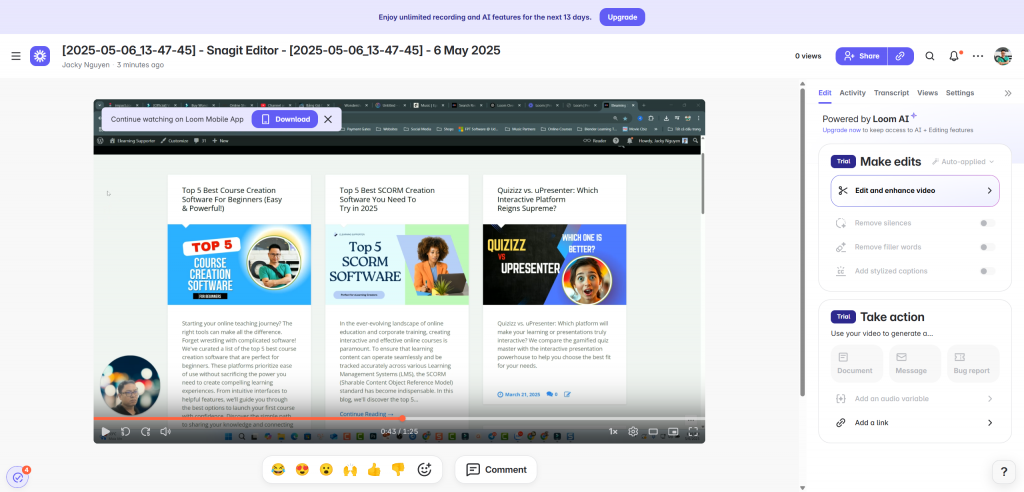

- Number 1 in speed and convenience: Record, finish, and share a link in just a few seconds. No need to wait for rendering or uploading.
- Easy sharing and feedback: Viewers can leave comments and emoji reactions right on the video’s timeline, making interaction intuitive.
- Minimalist, extremely easy-to-use interface: Loom is probably the easiest software to use on this list.
- AI Integration (Loom AI): Smart features like auto-generating titles, summarizing content, creating chapters, and removing silences help you perfect your video without spending time on editing.
Disadvantages of Loom:
- Very limited editing capabilities: You can only perform basic actions like trimming. Loom does not have professional annotation, effects, or zoom tools.
- Dependent on internet connection: As a cloud service, you need a stable network connection to record and upload videos.
- Limitations in the free version: The free plan often limits the duration of each video (e.g., 5 minutes) and the total number of videos you can store.
Version and Licensing:
- Starter Plan (Free): Allows for a maximum of 25 videos/person, with each video up to 5 minutes long.
- Business Plan: Costs $12.50 USD/user/month (billed annually). This plan unlocks all features, allowing for unlimited recording duration and quantity.
5. Xbox Game Bar: The “Quick Fix” Tool Built into Windows
Finally, a name that might be surprising: Xbox Game Bar. This is not standalone software but a feature built into the Windows 10 and 11 operating systems. Its main purpose is for gamers to record gameplay moments, but you can absolutely “requisition” it to record other application screens for simple purposes.
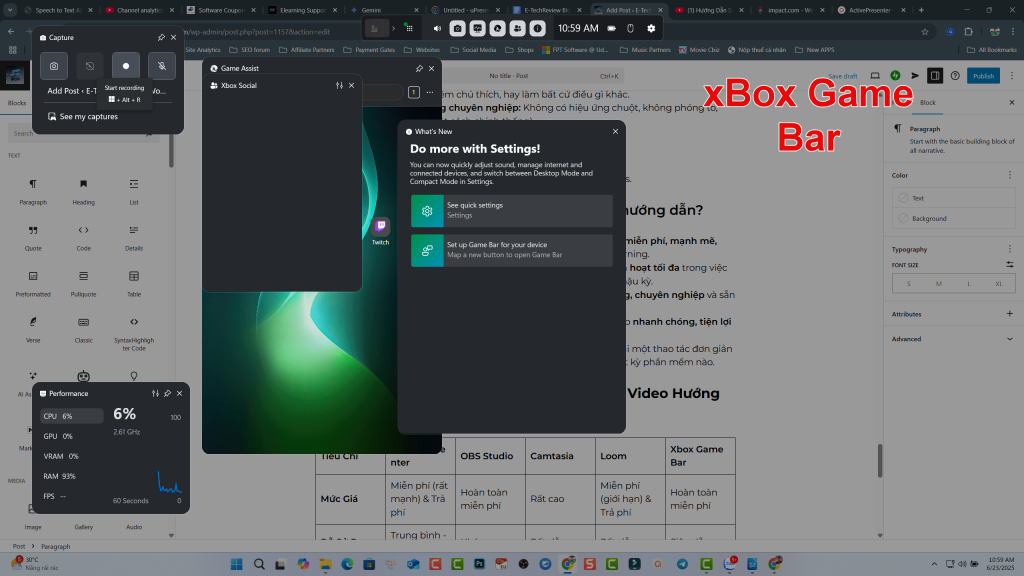
Outstanding Advantages of Xbox Game Bar:
- Built-in, no installation needed: It’s already available on your Windows computer. It’s there when you need it, no download required.
- Extremely simple: The interface is very clean. You just press a button to record, no complex setup needed.
- Lightweight and not resource-intensive: As part of the operating system, it runs quite lightly.
Disadvantages of Xbox Game Bar:
- Can only record one application window: This is the biggest limitation. You cannot record the entire desktop or switch between windows. It also doesn’t record File Explorer.
- Absolutely no editing features: It only outputs a raw MP4 video file. You cannot trim, add annotations, or do anything else.
- No professional features: No mouse effects, no zoom, no webcam recording (in a formal way).
Version and Licensing:
- Xbox Game Bar is completely free and part of Windows.
So, which software should you choose to make tutorial videos?
- ActivePresenter: The best choice for those who need a free, powerful, and comprehensive tool to create detailed tutorial videos and eLearning courses.
- OBS Studio: For technically savvy users who need maximum recording flexibility and don’t mind using another software for post-production.
- Camtasia: The premium choice for those who prioritize ease of use, professionalism, and are willing to invest in an efficient workflow.
- Loom: For teams that need a fast, convenient video communication tool that doesn’t require complex editing.
- Xbox Game Bar: The immediate “quick fix” solution when you need to record a simple action in a single application without wanting to install any additional software.
Overview Comparison Table of the 5 Best Tutorial Video Software 2025
| Criteria | ActivePresenter | OBS Studio | Camtasia | Loom | Xbox Game Bar |
|---|---|---|---|---|---|
| Price | Free (very powerful) & Paid | Completely Free | Very High | Free (limited) & Paid | Completely Free |
| Ease of Use | Medium-Hard | Hard | Very Easy | Very Easy | Super Easy |
| Video Editing | Professional | None | Professional | Very Basic | None |
| eLearning Features | Very Powerful | None | Basic | None | None |
| Suitable For | Everyone | Streamers, technical users | Businesses with a budget | Teams needing quick collaboration | Casual gamers, simple needs |
Final Words
Choosing the best tutorial video software depends on your ultimate goal.
- If you need a quick, simple solution for work communication, Loom is a good choice.
- If you just need to quickly record an action without editing, Xbox Game Bar is sufficient.
- If you are a professional streamer and don’t mind tinkering with technical aspects, OBS Studio is the unbeatable free tool.
- If budget is not an issue and you need a polished, smooth tool, Camtasia will not disappoint.
- However, if you are looking for the most comprehensive solution, a perfect balance of power, features, and cost, then ActivePresenter is the answer. With its free version offering no watermarks, no time limits, along with professional video editing and interactive eLearning creation capabilities, ActivePresenter deserves to be the number one companion for anyone wanting to create high-quality tutorial videos in 2025.
If you have any questions, don’t hesitate to leave a comment below. I’m always ready to help!